---
title: WordPress Plugin: Custom Function Widgets
date: 2008-02-04T17:53:13+00:00
modified: 2013-08-26T11:40:42+00:00
image:: https://kaspars.net/wp-content/uploads/2008/02/sidebar-widget-arrangement.png
permalink: https://kaspars.net/blog/wordpress-plugin-custom-function-widgets
post_type: post
author:
name: Kaspars
avatar: https://reverse.kaspars.net/gravatar/avatar/92bfcd3a8c3a21a033a6484d32c25a40b113ec6891f674336081513d5c98ef76?s=96&d=mm&r=g
post_tag:
- Plugin
category:
- WordPress
---
# WordPress Plugin: Custom Function Widgets
Many of the WordPress plugin authors don’t offer widgets, but only raw `PHP` functions (or *hooks*) which you have to insert into the theme’s template files. As the number of functions increases it becomes harder to manage it all, especially if you decide to uninstall some of them or add new ones.
It is especially inconvenient for those who are not so savvy, or don’t want to edit theme files. Moreover, if one decides to change the theme, the edits have to be repeated all over again.
Therefore, I made this *Custom Function Widget* plugin which allows you to create sidebar widgets without ever touching the theme’s files and use these widgets in any theme you like.
This plugin offers you up to 20 widgets you can then add to your theme’s sidebars. All you have to know is:
1. the *name* of the function, and
2. the *arguments* it requires (if any).
Additionally you can wrap the output in `HTML`, remove the widget’s title from the output, or remove the default widget wrapper (set in `functions.php` of your theme).
### Download *Custom Function Widgets* Plugin
**Important:** It has been tested to be compatible with WordPress 2.5 and 2.6.
Download custom-function-widgets.zip (Version 0.2 / 127 KB) — includes the plugin, *readme.txt* and four screenshots.
### Installation Instructions
1. Download the plugin and unzip its content
2. Upload all of the `custom_function_widgets` directory to `/wp-content/plugins/` directory. The final directory tree would like `/wp-content/plugins/
custom_function_widgets/custom_function_widgets.php`
3. [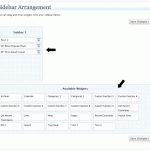](https://kaspars.net/wp-content/uploads/2008/02/sidebar-widget-arrangement.png "Sidebar Widget Arrangement") Activate the plugin through the *‘Plugins’* menu in your WordPress dashboard.
4. Go to *‘Presentation’ > ‘Widgets’* inside your WordPress dashboard. Just bellow the list of sidebars you will see a list of *‘Available Widgets’*. There you will find five new widgets *‘Custom Function 1’*, *‘Custom Function 2’*, etc.
5. Drag one of these widgets inside the sidebar of your choice. Once it is there, click on the widget’s options button (next to its title), which will open the widget’s options dialog box.
6. [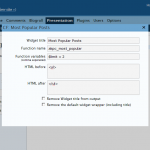](https://kaspars.net/wp-content/uploads/2008/02/custom-function-widgets-settings.png "Custom Function Widgets settings") There you can specify the following:
1. Wiget title
2. Name of the function you want to call *(the only obligatory item you must specify)*
3. Arguments to pass to the function, like `$onearg = 2, 'Something', $other = 3`
4. HTML to display *before the output* of the function
5. HTML to display *after the output* of the function
6. Option to hide the title of the widget (which you specified as *Widget title*) during the ouput
7. Option to remove the default wrapper of the widget (defined in `template.php` of your theme’s folder, for each sidebar)
7. Close the widget options pop-up and click *‘Save Changes’*
8. Now you should see the new widget in the sidebar of you blog/site
### Example: creating a widget for *Popularity Contest* plugin
To better illustrate where to find this information and how to create a widget, lets use the ‘[Popularity Contest](http://alexking.org/projects/wordpress/readme?project=popularity-contest)‘ plugin by [Alex King](http://alexking.org/). Once you install Popularity Contest, you have several PHP *hooks* available:
- `akpc_most_popular($limit = 10, $before = , $after = )`
- `akpc_most_popular_in_cat($limit = 5, $before, $after, $cat_ID = current category)`
- `akpc_most_popular_in_month($limit, $before, $after, $m = YYYYMM)`
To use either of these hooks, simply drag an new *‘Custom Function’* widget (from *‘Available Widgets’* under *‘Presentation’ > ‘Widgets’*) inside a sidebar of your choice.
Click on the Widget’s options button and enter the following details (for the `akpc_most_popular` hook as an example):
1. Widget title: `Most Popular Posts`
2. Function name: `akpc_most_popular`
3. Function variables: `$limit = 5, $before = , $after = `
4. HTML Before: ``
6. Leave unchecked both `'Remove Widget title from the output'` and `'Remove the default widget wrapper'` options
Once you specify a Widget title, it will be also used in your list of widgets (instead of default *‘Custom Function #’*).
### What’s next?
There are already other WordPress plugins planned for a public release very soon. On this blog you can already see the **Tabbed Widgets** plugin which enables you to put any number of other widgets inside a single widget as tabs (with an option to rotate). **Tabbed Widgets** plugin [has been released](https://kaspars.net/blog/wordpress/322-tabbed-widgets-plugin-for-wordpress/).
### Notes
- I will try to get this plugin submitted at the official WordPress plugin repository, but so far nobody has reviewed my application.
- Please leave your ideas, suggestions and bug reports in the comments.