---
title: Limit the Number of Words or Characters in WordPress Editor
date: 2012-06-06T11:11:37+00:00
modified: 2015-11-18T13:28:57+00:00
image:: https://kaspars.net/wp-content/uploads/2012/06/limit-wordpress-editor-word-char-count.png
permalink: https://kaspars.net/blog/limit-number-words-characters-in-wordpress-editor
post_type: post
author:
  name: Kaspars
  avatar: https://reverse.kaspars.net/gravatar/avatar/92bfcd3a8c3a21a033a6484d32c25a40b113ec6891f674336081513d5c98ef76?s=96&d=mm&r=g
post_tag:
  - How to
  - Snippet
category:
  - WordPress
---

# Limit the Number of Words or Characters in WordPress Editor

[![Limit the number of characters or words inside WordPress post editor](https://kaspars.net/wp-content/uploads/2012/06/limit-wordpress-editor-word-char-count.png?strip=all&quality=90&resize=500,321 "Limit the number of characters or words inside WordPress post editor")](https://kaspars.net/wp-content/uploads/2012/06/limit-wordpress-editor-word-char-count.png)Display a warning to editors when the number of characters or words exceeds a certain limit
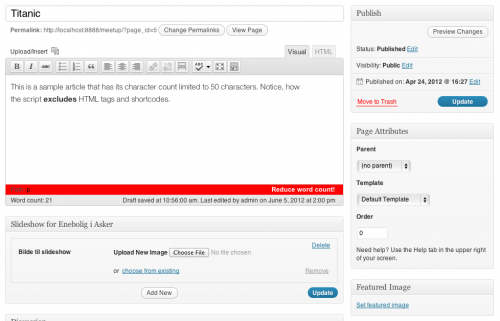


Sometimes you want to limit the number of words that your editors or clients can enter into a post (usually of a custom post type). Here is a simple snippet of PHP and javascript that retrieves the current tinyMCE editor on the page, counts the number of characters in the editor and displays a warning if the character count exceeds a certain limit. Using a prominent warning instead of truncating content automatically offers a much better usability.

### WordPress Filter and Javascript

```
add_action( 'admin_print_footer_scripts', 'check_textarea_length' );

function check_textarea_length() {
	?>
	<script type="text/javascript">
		jQuery( document ).ready( function($) {
			var editor_char_limit = 50;

			$('.mceStatusbar').append('<span class="word-count-message">Reduce word count!</span>');

			tinyMCE.activeEditor.onKeyUp.add( function() {
				// Strip HTML tags, WordPress shortcodes and white space
				editor_content = this.getContent().replace(/(<[a-zA-Z\/][^<>]*>|\[([^\]]+)\])|(\s+)/ig,''); 

				if ( editor_content.length > editor_char_limit ) {
					$('#content_tbl').addClass('toomanychars');
				} else {
					$('#content_tbl').removeClass('toomanychars');
				}
			});
		});
	</script>

	<style type="text/css">
		.wp_themeSkin .word-count-message { font-size:1.1em; display:none; float:right; color:#fff; font-weight:bold; margin-top:2px; }
		.wp_themeSkin .toomanychars .mceStatusbar { background:red; }
		.wp_themeSkin .toomanychars .word-count-message { display:block; }
	</style>
	<?php
}
```

If using this in production, remember to move both Javascript and CSS into files and use appropriate admin hooks for adding them only on pages that display the editor you need.

### Make it a Plugin

It would be great if someone could turn this into a plugin where users can specify the post type, characters limit and the warning message.