---
title: How to Automatically Add Image Credit or Source URL to Photo Captions in WordPress
date: 2011-10-16T16:32:44+00:00
modified: 2012-02-25T12:59:57+00:00
image:: https://kaspars.net/wp-content/uploads/2011/10/image-source-url-credit-dashboard.png
permalink: https://kaspars.net/blog/how-to-automatically-add-image-credit-or-source-url-to-photo-captions-in-wordpress
post_type: post
author:
name: Kaspars
avatar: https://reverse.kaspars.net/gravatar/avatar/92bfcd3a8c3a21a033a6484d32c25a40b113ec6891f674336081513d5c98ef76?s=96&d=mm&r=g
post_tag:
- How to
- Snippet
category:
- WordPress
---
# How to Automatically Add Image Credit or Source URL to Photo Captions in WordPress
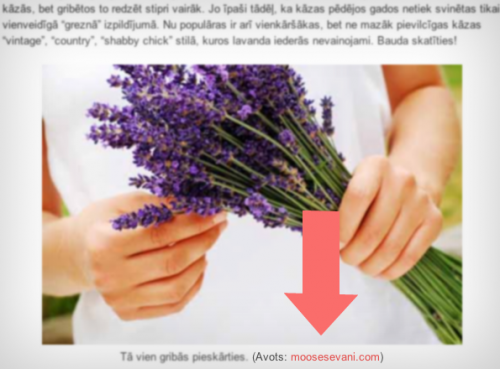Photo credit added automatically to every photo with a caption
Crediting and linking the source of any republished photo or illustration on the web is one of the most important best practices of web publishing. Unfortunately, there isn’t a standard way of doing it in WordPress and authors are left with their own decision on how and where to credit the original author or website.
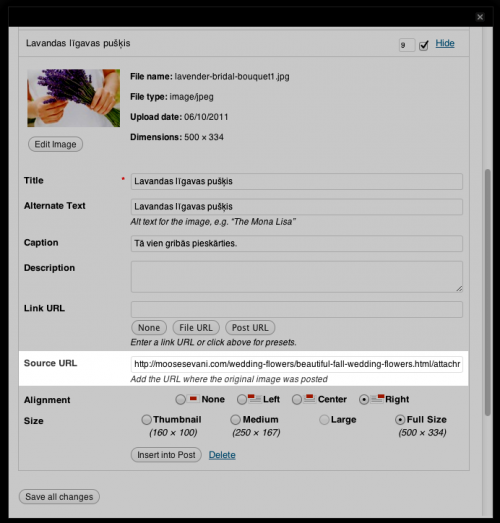
I decided to add **a simple “Source URL” input field to every image that is uploaded**. Adding credit with a link to the source of that image now becomes as easy as adding a title or caption for an image:
[](https://kaspars.net/wp-content/uploads/2011/10/image-source-url-credit-dashboard.png)
### Implementation
You need to add the [following snippet of PHP](http://pastebin.com/FZJ3DJBg) to your theme’s `functions.php`:
#### Add the source URL input field to image upload screen
```
add_filter("attachment_fields_to_edit", "add_image_source_url", 10, 2);
function add_image_source_url($form_fields, $post) {
$form_fields["source_url"] = array(
"label" => __("Source URL"),
"input" => "text",
"value" => get_post_meta($post->ID, "source_url", true),
"helps" => __("Add the URL where the original image was posted"),
);
return $form_fields;
}
add_filter("attachment_fields_to_save", "save_image_source_url", 10 , 2);
function save_image_source_url($post, $attachment) {
if (isset($attachment['source_url']))
update_post_meta($post['ID'], 'source_url', esc_url($attachment['source_url']));
return $post;
}
```
#### Automatically append the source URL to image captions
```
add_filter('img_caption_shortcode', 'caption_shortcode_with_credits', 10, 3);
function caption_shortcode_with_credits($empty, $attr, $content) {
extract(shortcode_atts(array(
'id' => '',
'align' => 'alignnone',
'width' => '',
'caption' => ''
), $attr));
// Extract attachment $post->ID
preg_match('/\d+/', $id, $att_id);
if (is_numeric($att_id[0]) && $source_url = get_post_meta($att_id[0], 'source_url', true)) {
$parts = parse_url($source_url);
$caption .= ' ('. __('via') .' '. $parts['host'] .')';
}
if (1 > (int) $width || empty($caption))
return $content;
if ($id)
$id = 'id="' . esc_attr($id) . '" ';
return '
'
. do_shortcode($content) . '
' . $caption . '
';
}
```
Please note that the source URL will be visible only if you specify image caption upon inserting the image.