---
title: Notes on Gree Amber Nordic / Prestige GWH09YD-S6DBA2A Heat Pump
date: 2022-02-13T11:58:16+00:00
modified: 2025-11-13T17:00:16+00:00
image:: https://kaspars.net/wp-content/uploads/2022/02/gree-GWH09YD-S6DBA1.jpeg
permalink: https://kaspars.net/blog/gree-amber-nordic-gwh09yd-s6dba1
post_type: post
author:
name: Kaspars
avatar: https://reverse.kaspars.net/gravatar/avatar/92bfcd3a8c3a21a033a6484d32c25a40b113ec6891f674336081513d5c98ef76?s=96&d=mm&r=g
category:
- Electronics
- Home Automation
post_tag:
- Home Assistant
---
# Notes on Gree Amber Nordic / Prestige GWH09YD-S6DBA2A Heat Pump
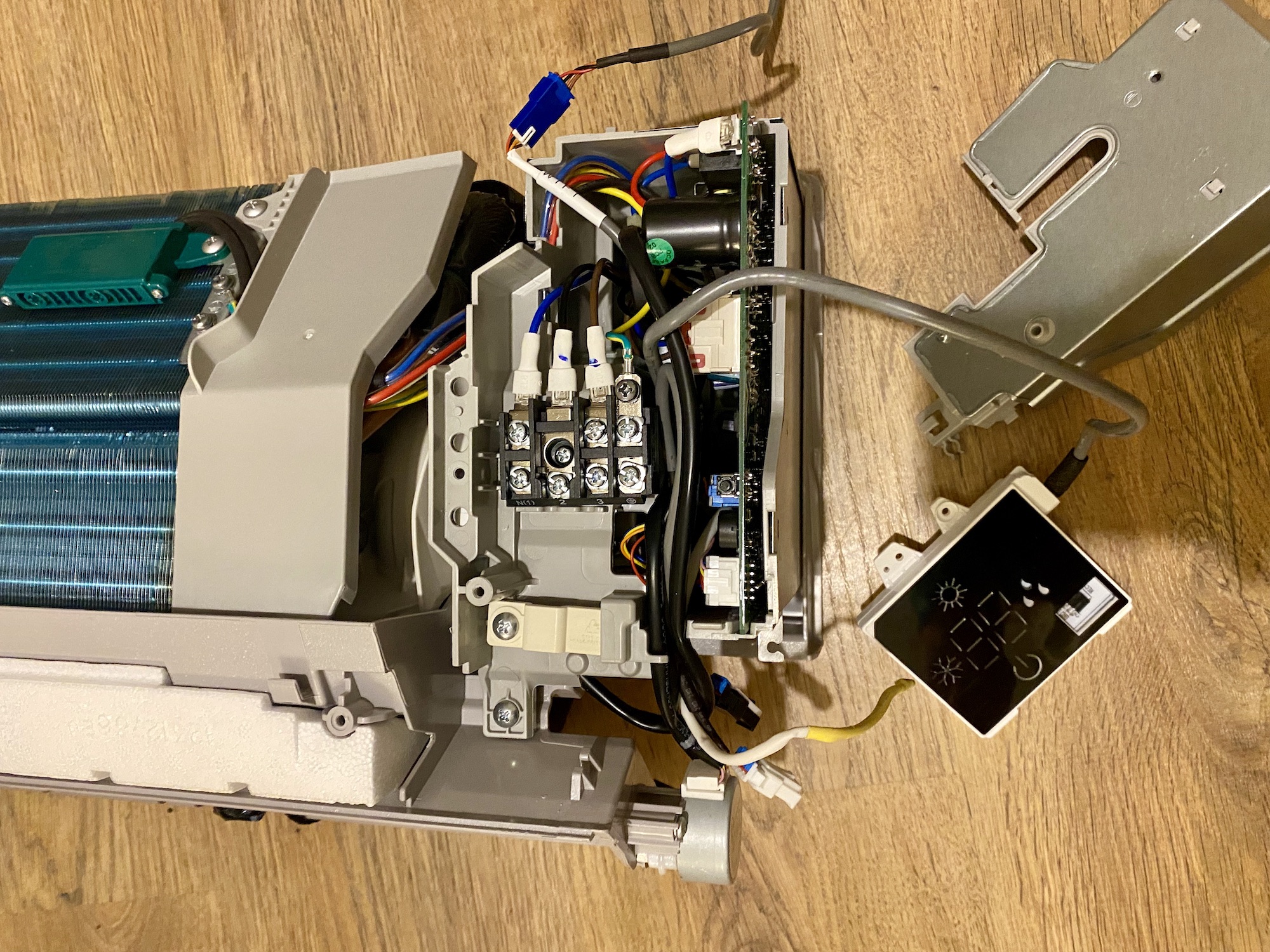Gree GWH09YD-S6DBA1A indoor heat exchanger power connectors, PCB with IR and WiFi modules.As part of [an experiment to add domestic water heating capabilities to conventional mini-split ACs](https://kaspars.net/blog/mini-split-space-hot-water-heating), I purchased an air-source heat pump **Gree GWH09YD-S6DBA2A** which has an inverter controlled compressor and an electronic expansion valve that allows it to work efficiently even down to -30℃ (-22℉).
- Model: GWH09YD-S6DBA2A (outdoor), S6DBA1A (indoor)
- Product code: CB466000100/CB466000102
- Cooling capacity: 2.7kW
- Heating capacity: 3.5kW
- Refrigerant: R32
- Remote model: YAG1FB3
## Service Manual
Most of the technical information in this post has been retrieved from the official service manual:
[Gree Amber GWH09YD-GWH12YD Service Manual (PDF)](https://kaspars.net/wp-content/uploads/2022/02/air-pump-gree-amber-GWH09YD-GWH12YD-service-manual.pdf)[Download](https://kaspars.net/wp-content/uploads/2022/02/air-pump-gree-amber-GWH09YD-GWH12YD-service-manual.pdf)
## Remote IR Receiver Module
Attached to the back of the inner block cover is a display module combined with an IR receiver. I was wondering if the IR receiver logic could be handled there and forwarded to the main PCB via something like UART. Turns out the LCD elements and the IR receiver diode run down to the main PCB so there is nothing to hijack.
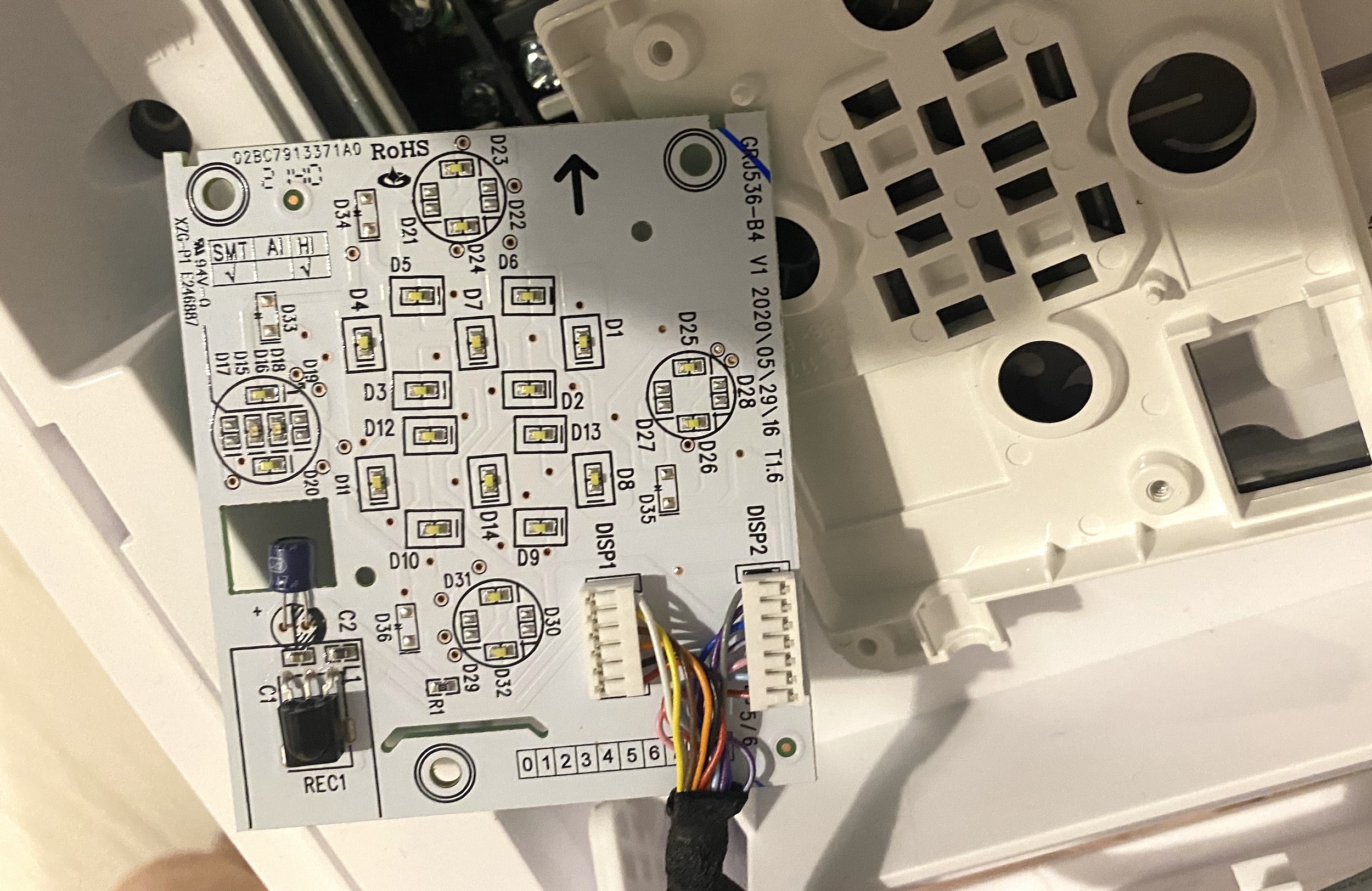Back of the PCB for Gree GWH09YD-S6DBA2A front cover LCD module with IR receiver.### IR Remote Protocol
I used an infrared photodiode attached directly to pins `GND` and `D3` (which is pulled high) of Wemos D1 mini and the `IRrecvDumpV3.ino` [sketch bundled](https://github.com/crankyoldgit/IRremoteESP8266/blob/8b1bfc37ec4afb79a09c757cc28044a867d2f77e/examples/IRrecvDumpV3/IRrecvDumpV3.ino) with v2.8.1 of the [IRremoteESP8266 library](https://github.com/crankyoldgit/IRremoteESP8266) to decoded the messages.
Here are the infrared bit sequences captured by the Saleae logic analyser:
Capture of the IR signal from the YAG1FB3 remote when turning on the device. [YAG1FB3 remote IR capture (Saleae)](https://kaspars.net/wp-content/uploads/2022/02/gree-yag1fb3-turn-on-remote.sal)[Download](https://kaspars.net/wp-content/uploads/2022/02/gree-yag1fb3-turn-on-remote.sal)
We can clearly see two sets of messages that are repeated twice. Each message has two parts and the first one starts with a longer sync header.
Initially it complained about the packets being too large to fit in the allocated buffer:
```
WARNING: IR code is too big for buffer (>= 1024). This result shouldn't be trusted until this is resolved. Edit & increase `kCaptureBufferSize`.
```
That is because of the `kTimeout` constant which is set to `50` by default and is 10ms above the actual period of 40ms between the groups of messages that we see in the logic analyser output above. By setting the value to 30:
```
const uint8_t kTimeout = 30;
```
it started decoding the packets as expected:
```
Protocol : GREE
Code : 0x0C084070000000E0 (64 Bits)
Mesg Desc.: Model: 1 (YAW1F), Power: On, Mode: 4 (Heat), Temp: 24C, Fan: 0 (Auto), Turbo: Off, Econo: Off, IFeel: Off, WiFi: Off, XFan: Off, Light: Off, Sleep: Off, Swing(V) Mode: Manual, Swing(V): 0 (Last), Swing(H): 0 (Off), Timer: Off, Display Temp: 0 (Off)
uint16_t rawData[139] = {9004, 4474, 664, 540, 664, 540, 666, 1642, 664, 1644, 664, 542, 664, 540, 664, 542, 664, 542, 664, 542, 664, 542, 664, 542, 664, 1642, 664, 542, 664, 540, 666, 540, 664, 540, 664, 542, 664, 542, 664, 542, 664, 540, 664, 540, 664, 542, 664, 1642, 664, 542, 664, 540, 666, 540, 666, 540, 664, 540, 666, 1642, 664, 1642, 664, 1642, 664, 540, 664, 542, 664, 1642, 664, 540, 664, 19974, 664, 542, 664, 542, 664, 542, 664, 542, 664, 542, 664, 542, 662, 542, 662, 542, 664, 542, 664, 542, 664, 542, 664, 542, 662, 544, 662, 544, 662, 544, 662, 542, 662, 544, 662, 542, 662, 542, 662, 544, 662, 544, 662, 542, 664, 544, 662, 542, 662, 544, 662, 542, 662, 542, 664, 542, 662, 544, 662, 1644, 662, 1644, 662, 1644, 662}; // GREE
uint8_t state[8] = {0x0C, 0x08, 0x40, 0x70, 0x00, 0x00, 0x00, 0xE0};
```
In the decoded bit timing sequence above we see a 9004us header mark followed by a 4474us space and then the actual message bits where the bit mark is 664us, logical `0` space is 542us, logical `1` space is 1642us and with 19974us between the two packets of the message.
Enabling the I-feel mode (where the remote sends the indoor temperature to the indoor unit) does append another packet to the end which isn’t parsed correctly, though:
```
Protocol : UNKNOWN
Code : 0x5EF985F1 (18 Bits)
uint16_t rawData[35] = {6008, 2986, 658, 546, 658, 548, 658, 548, 658, 1648, 658, 1648, 658, 546, 658, 548, 658, 548, 658, 1650, 658, 546, 658, 1648, 658, 546, 658, 548, 658, 1648, 658, 548, 658, 1648, 658};
```
It appears that this packet is supported [by the `arduino-heatpumpir` library](https://github.com/ToniA/arduino-heatpumpir/blob/279ae403af3fee9d1478a4a2f6632fa1b653c4bb/GreeHeatpumpIR.h#L17-L20). According to the [`GreeYACHeatpumpIR::send()` method](https://github.com/ToniA/arduino-heatpumpir/blob/279ae403af3fee9d1478a4a2f6632fa1b653c4bb/GreeHeatpumpIR.cpp#L314-L336) we’re expecting a header followed by two data bytes ([using the following logic](https://github.com/ToniA/arduino-heatpumpir/blob/279ae403af3fee9d1478a4a2f6632fa1b653c4bb/IRSender.cpp#L12-L30)) and one closing `GREE_YAC_BIT_MARK`:
- `6008, 2986` are the two header marks,
- `658,546 | 658,548 | 658,548 | 658,1648 | 658,1648 | 658,546 | 658,548 | 658,548` maps to `0x00011000` in binary which is `24` in decimal (the temperature measured by the remote).
- `658,1650 | 658,546 | 658,1648 | 658,546 | 658,548 | 658,1648 | 658,548 | 658,1648` maps to `0b10100101` or `0xA5` in hex [as expected](https://github.com/ToniA/arduino-heatpumpir/blob/279ae403af3fee9d1478a4a2f6632fa1b653c4bb/GreeHeatpumpIR.cpp#L320).
- `658` is the closing `GREE_YAC_BIT_MARK`.
## Wi-Fi Module
There is a built-in Wi-Fi module which uses [a protocol that has been reverse-engineered](https://github.com/cmroche/greeclimate) and enables full control over the local network once the unit has been added to the Wi-Fi network using the GREE+ app for iOS and Android. There is even [a fully functional HomeAssistant integration](https://www.home-assistant.io/integrations/gree/).
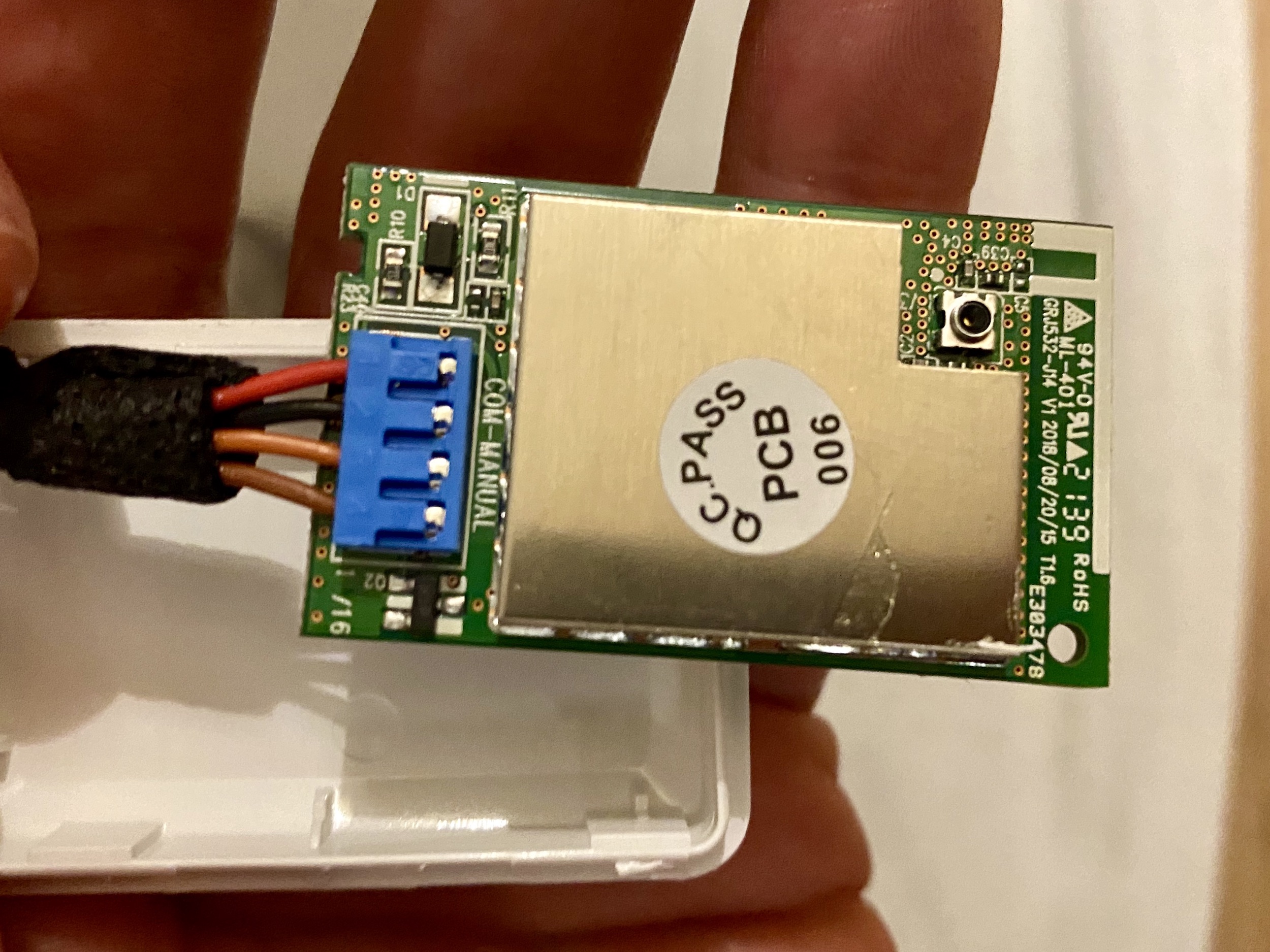Gree GWH09YD-S6DBA2A built-in WiFi module top.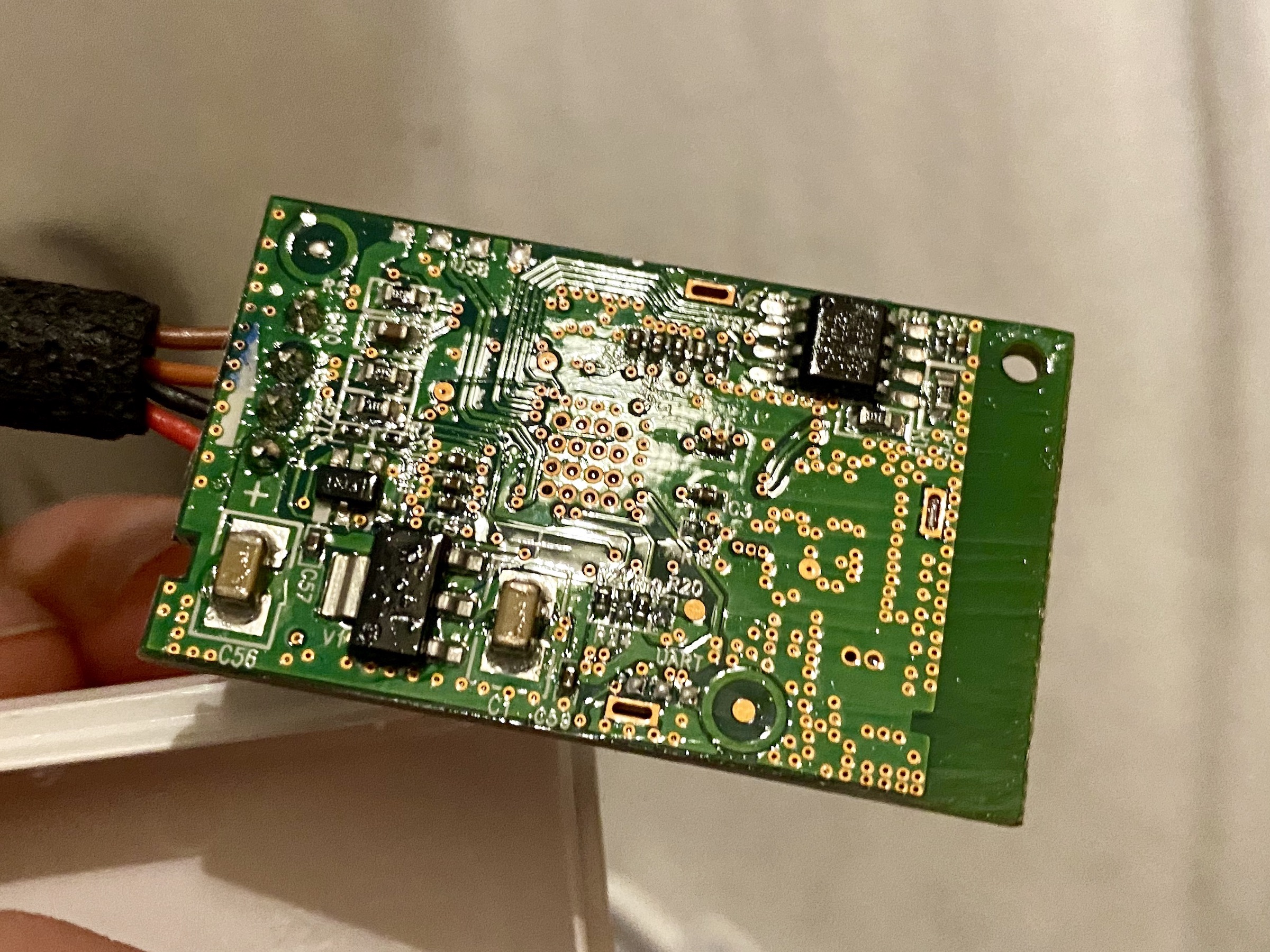Gree GWH09YD-S6DBA2A built-in WiFi module back.The `COM-MANUAL` label and the four wires going to the module from the PCB indicate that this is possibly an UART-to-WIFI bridge. However, attaching the digital logic analyser probes to the dark-brown, light-brown and GND pins produced a lot of noise without clear indication of the data being transfered.
### Wi-Fi Module Firmware
Initially the unit was reporting firmware version `v1.00` and only in April 2023 it offered an update to `v3.76` via the official [Gree+ app](https://apps.apple.com/us/app/gree/id1167857672) which completed successfully.
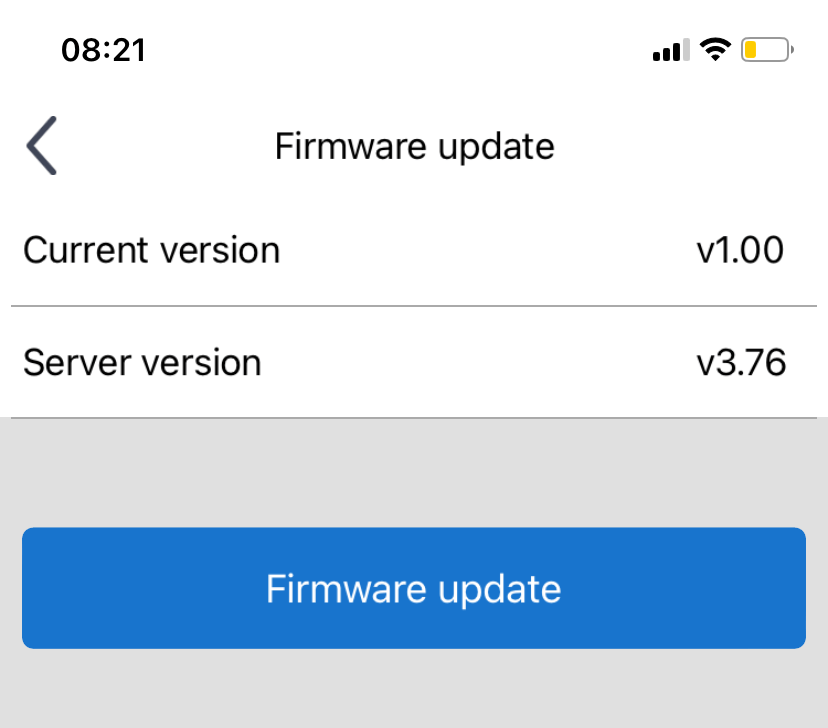Firmware update to v3.76.
In July 2023 it started showing an available update to `v3.77` but I haven’t been able to apply it due to a network timeout after requesting the update.
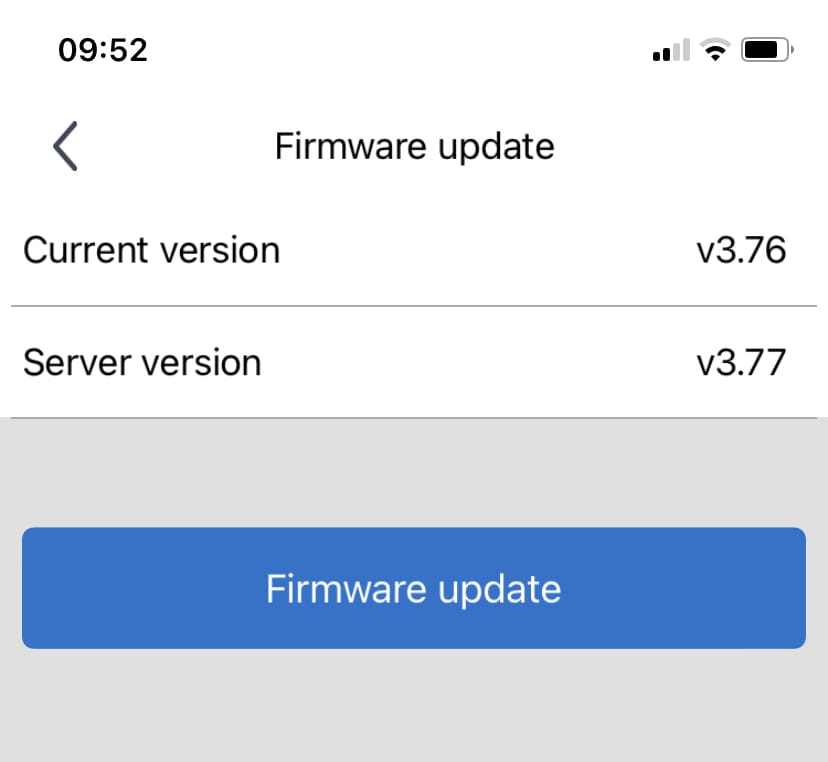Firmware update to v3.77.
There is a [GitHub repository collecting all the firmware files](https://github.com/maxim-smirnov/gree-wifimodule-firmware) which can be obtained from Gree servers in the same way the mobile app does it. The app uses the firmware version reported by the [`hid` parameter](https://github.com/cmroche/greeclimate/blob/d13c0db0b42164ffe980f575ed9befa7dba44968/greeclimate/device.py#L260) such as `362001065736+U-QCOM4004CV3.76.bin` for my unit where the first part `362001065736` is the `firmwareCode` that is used to check for a new version by making a GET request to:
```
http://grih.gree.com/wifiModule/Lastversion?firmwareCode=362001065736
```
where `grih.gree.com` can be any of the local servers such as `eu.grih.gree.com`, for example. It returns a JSON blob:
```
{
"CreateDate": "2023-06-15 08:27:08",
"commProtVer": "V1.2.1",
"desc": "1、devLogin包中增加hid、ModelType、bc字段;\r\n2、连接调度服时优先使用1812端口(1812端口与5000端口轮换使用);\r\n3、配网成功后不响应Wi-Fi开关。",
"forcedUpgrade": 1,
"frcUpgdType": 0,
"r": 200,
"url": "http://grih.gree.com/wifiModule/image/10528/145680",
"ver": "3.77"
}
```
or for from the [EU server](http://eu.grih.gree.com/wifiModule/Lastversion?firmwareCode=362001065736):
```
{
"CreateDate": "2023-07-14 02:29:37",
"commProtVer": "V1.2.1",
"desc": "In this version, we have fixed some known issues.",
"forcedUpgrade": 0,
"r": 200,
"url": "http://eu.grih.gree.com/wifiModule/image/10141/145680",
"ver": "3.77"
}
```
Notice how the firmware URLs are different! However, the contents of both files is identical as confirmed by checksums reported by the server (the `FileMd5` response HTTP header):
```
$ curl -I http://grih.gree.com/wifiModule/image/10528/145680
HTTP/1.1 200 OK
Server: nginx/1.26.1
Date: Sun, 03 Nov 2024 12:08:45 GMT
Content-Type: application/octet-stream
Content-Length: 145680
Connection: keep-alive
Content-Disposition: attachment; filename="ota_sdkshell-1335624479074045096.bin"
Content-Range: bytes 0-145679/145680
FileMd5: f5ac9d07b5499dac210d550710f7ef2a
Strict-Transport-Security: max-age=31536000
X-Frame-Options: SAMEORIGIN
X-Content-Type-Options: nosniff
X-XSS-Protection: 1; mode=block
Cache-Control: no-cache
Set-Cookie: HttpOnly
Set-Cookie: Secure
```
and:
```
$ curl -I http://eu.grih.gree.com/wifiModule/image/10141/145680
HTTP/1.1 200 OK
Date: Sun, 03 Nov 2024 12:09:19 GMT
Content-Type: application/octet-stream
Content-Length: 145680
Connection: keep-alive
Server: nginx
Content-Disposition: attachment; filename="U-QCOM4004CV3.77.bin-9979849298584095054.bin"
Content-Range: bytes 0-145679/145680
FileMd5: f5ac9d07b5499dac210d550710f7ef2a
supcc: 3324d648008ce504a8a519571dc2aa8e4816e5ae92c53100a3dd9052e9b9165c
Strict-Transport-Security: max-age=31536000
X-Frame-Options: SAMEORIGIN
X-Content-Type-Options: nosniff
X-XSS-Protection: 1; mode=block
Cache-Control: no-cache
Set-Cookie: HttpOnly
Set-Cookie: Secure
```
and tested locally:
```
$ md5sum 3.77-eu.bin
f5ac9d07b5499dac210d550710f7ef2a 3.77-eu.bin
$ md5sum 3.77.bin
f5ac9d07b5499dac210d550710f7ef2a 3.77.bin
```
Having access to these firmware files allows us to do all kinds of interesting things such find diffs between versions and extract string references using [GNU binutils](https://www.gnu.org/software/binutils/). Here are all the strings as text files for each version:
- [3.74 strings](https://kaspars.net/wp-content/uploads/2022/02/3.74.strings.txt)
- [3.76 strings](https://kaspars.net/wp-content/uploads/2022/02/3.76.strings.txt)
- [3.77 strings](https://kaspars.net/wp-content/uploads/2022/02/3.77.strings.txt)
- [3.78 (test version) strings](https://kaspars.net/wp-content/uploads/2022/02/3.78.strings.txt)
The most valuable find appears to be the `QCOM4004` reference which points to only a few pages on the web, including [this documentation](https://docs.utyun.com/TechnicalPlatform/ServicePlatform/yingjianyun) for Alibaba Cloud platform and SDK.
It is interesting to see that the firmware codes don’t increase with each version — for example, the same code `362001065736` is used for versions 3.76, 3.77 and the test 3.78. It is also not clear why the difference between 3.74 and 3.77 is so tiny:
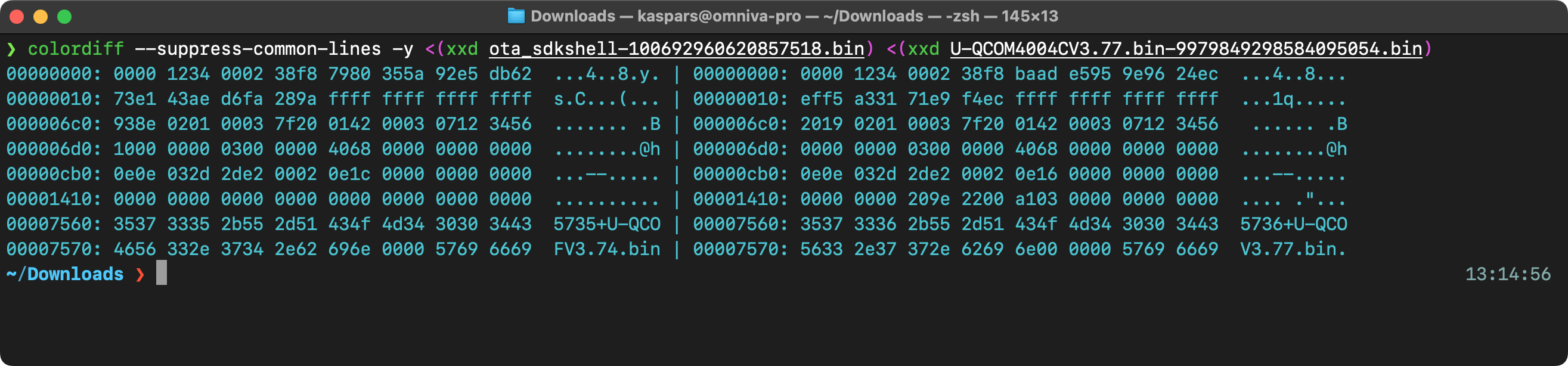Diff between versions 3.74 and 3.77 of Gree firmware.It is almost as if 3.77 rolls back 3.76 to 3.74.
### Wi-Fi Firmware Update
The update process is initiated by the mobile app which connects to the unit via a jump server that helps with traversing the layers of NAT.
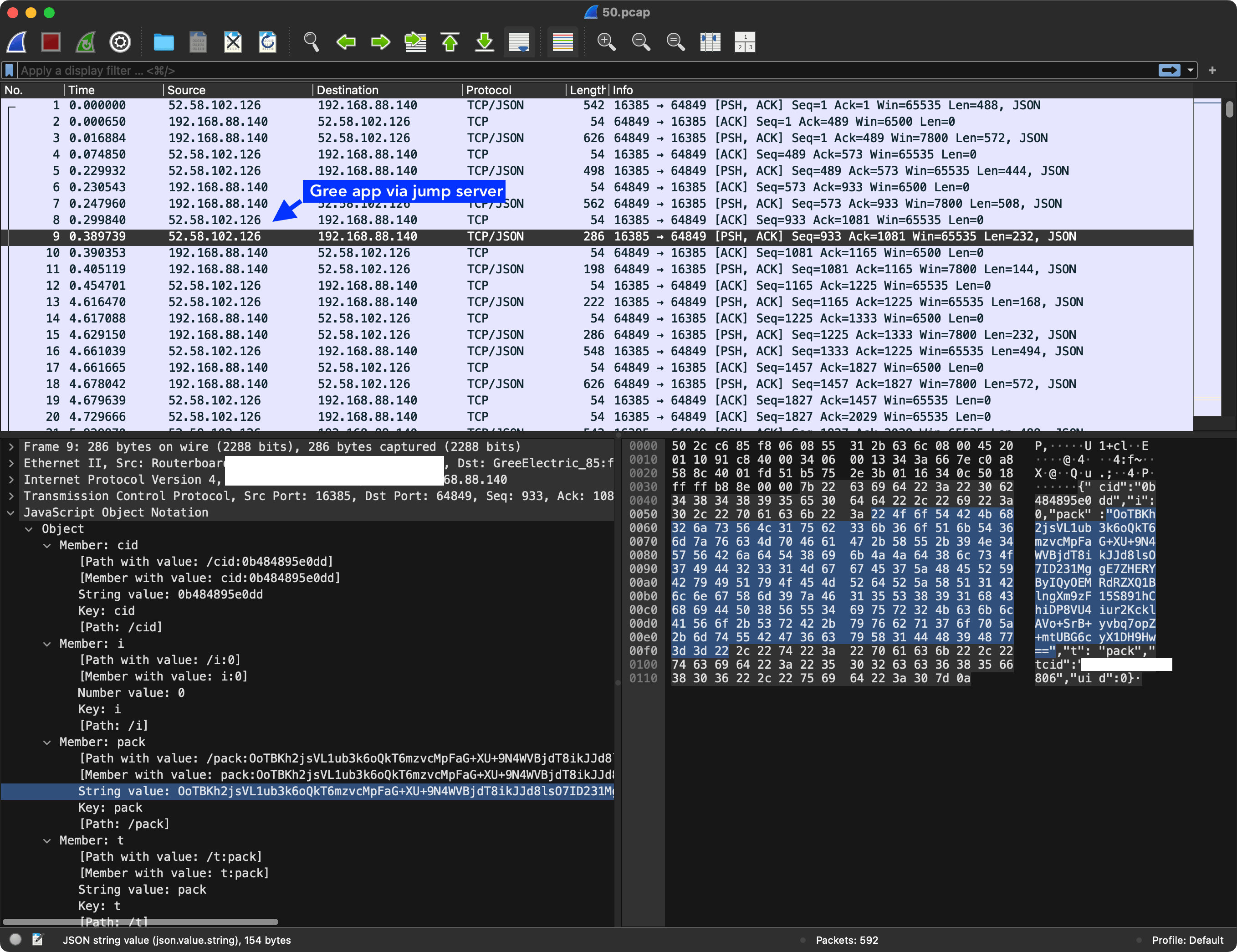A network capture of Gree+ app triggering a firmware update of Wi-Fi module.First, it fetches the `hid` attribute of the current firmware via an encrypted `pack` request:
```
{"cols":["Pow","Mod","TemUn","SetTem","TemRec","WdSpd","Tur","Quiet","SwUpDn","SwingLfRig","Air","Blo","Health","SvSt","Lig","StHt","SwhSlp","SlpMod","LigSen","UvcControl","Dmod","Dwet","ModelType","HeatCoolType","AllErr","AppTimer","AIEnSaveDis","hid"],"mac":"UNIT_MAC_ID","t":"status"}
```
to which the unit responds with encoded:
```
{"t":"dat","mac":"UNIT_MAC_ID","r":200,"cols":["Pow","Mod","TemUn","SetTem","TemRec","WdSpd","Tur","Quiet","SwUpDn","SwingLfRig","Air","Blo","Health","SvSt","Lig","StHt","SwhSlp","SlpMod","LigSen","Dmod","Dwet","ModelType","HeatCoolType","AllErr","AppTimer","hid"],"dat":[0,4,0,19,0,5,0,0,0,1,0,0,0,0,0,0,0,0,0,0,0,32858,0,0,0,"362001065736+U-QCOM4004CV3.76.bin"]}
```
after which the app does another `pack` request:
```
{"cols":["TemsSenOut","TemSen","DwatSen","FaultDisplay","AntiDirectBlow","hid","ElcEn","Slp1L1","Slp1H1","Slp1L2","Slp1H2","Slp1L3","Slp1H3","Slp1L4","Slp1H4","Slp1L5","Slp1H5","Slp1L6","Slp1H6","Slp1L7","Slp1H7","Slp1L8","Slp1H8"],"mac":"UNIT_MAC_ID","t":"status"}
```
to which the unit responds with:
```
{"t":"dat","mac":"502cc685f806","r":200,"cols":["TemSen","DwatSen","hid","Slp1L1","Slp1H1","Slp1L2","Slp1H2","Slp1L3","Slp1H3","Slp1L4","Slp1H4","Slp1L5","Slp1H5","Slp1L6","Slp1H6","Slp1L7","Slp1H7","Slp1L8","Slp1H8"],"dat":[51,0,"362001065736+U-QCOM4004CV3.76.bin",160,0,160,0,160,0,160,0,160,0,160,0,160,0,160,0]}
```
and then finally the app uses the data from the update sever mentioned above to send another encrypted `pack` payload:
```
{"t":"upgrade","url":"http://eu.grih.gree.com/wifiModule/image/10141/145680","mac":"UNIT_MAC_ID"}
```
to which the unit responds with `pack` that is encrypted with the hard-coded `a3K8Bx%2r8Y7#xDh` key:
```
{"t":"ret","r":200,"mac":"502cc685f806"}
```
Afterwards the app appears to wait for the unit to update itself (for a hardcoded period of time) and to eventually respond with an updated `hid` value matching the new firmware. However, in my case it never happens even if I send an upgrade request with a different firmware URL.
## BMS and COM Manual Connections
There are two additional wire connections that are coming out of the PCB that are left not connected:
- `BMS` which is potentially a Modbus or CAN connections for Building Management Systems.
- `COM-MANUAL` which is designated as “Wired Controller (optional)” in the service manual.
There is a lot of potential for gaining full read-write access to the device through these ports but I haven’t gotten to that yet.
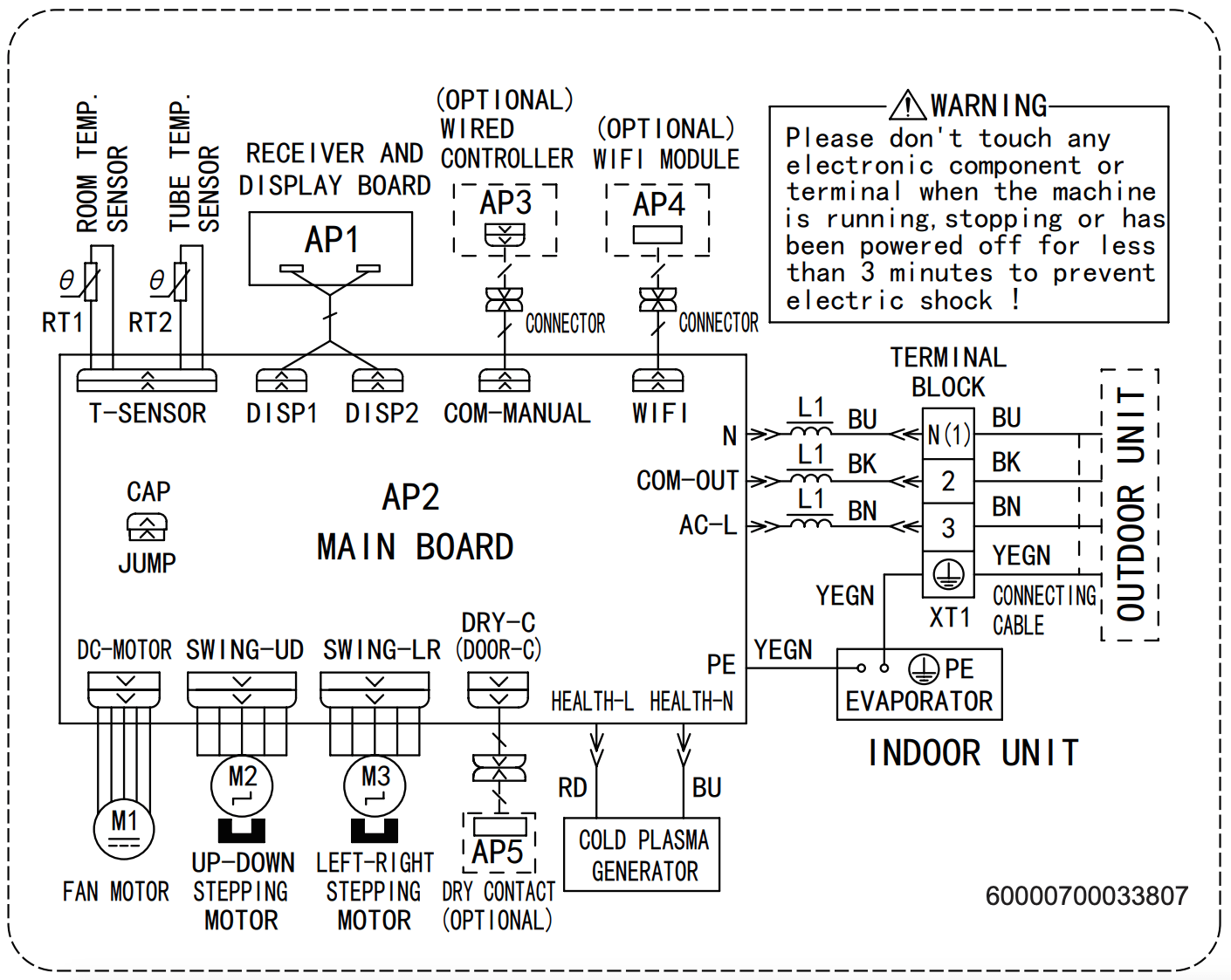Gree GWH09YD-S6DBA1A indoor PCB diagram.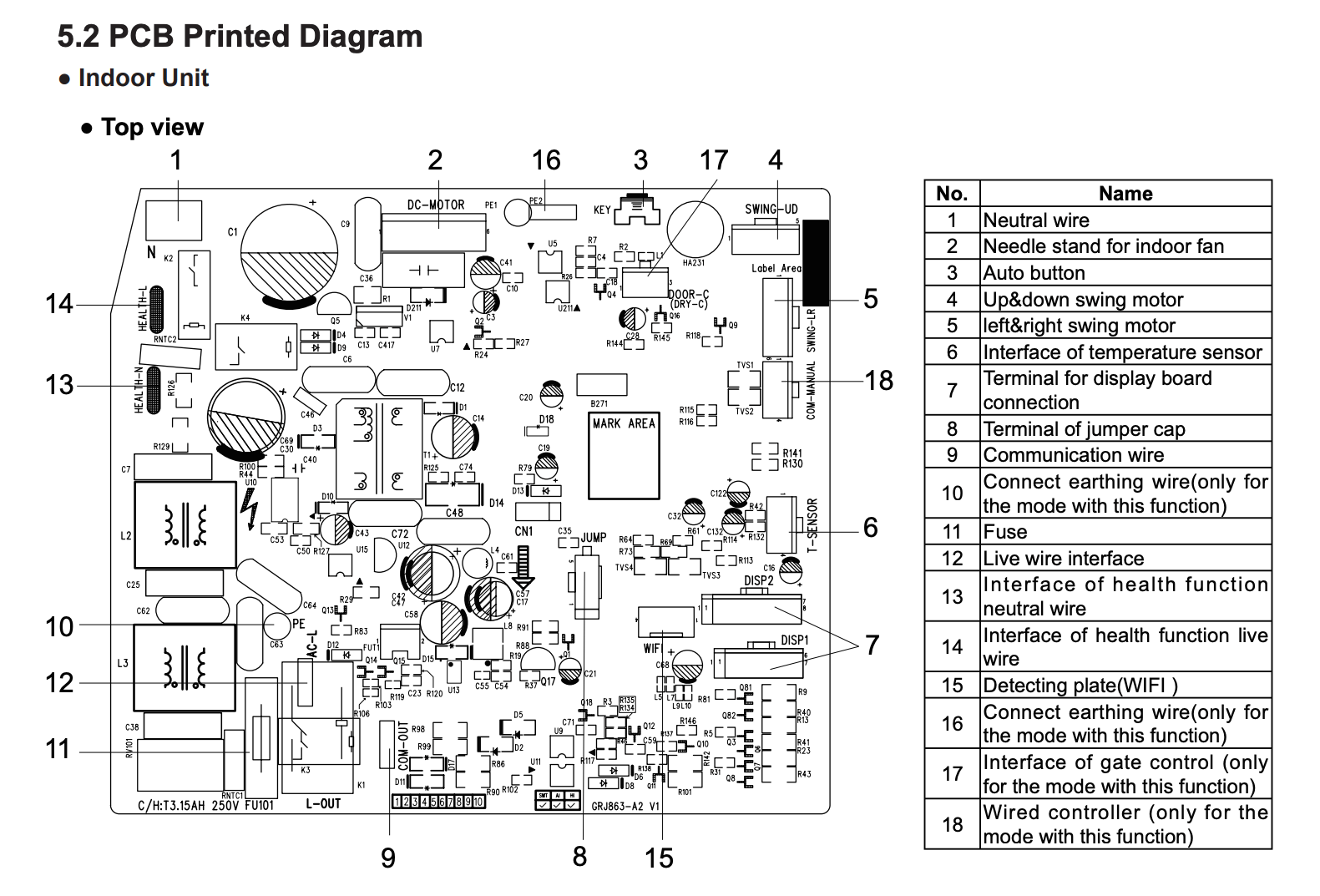Gree GWH09YD-S6DBA1A indoor PCB.## Wired Controller XK76
Some of the Gree models support wired controllers or thermostats in addition to the RF remotes. This indoor unit has two unpopulated connectors labeled `BMS` and (forgot the other one) in addition to the `WIFI` cable that is connected to the WIFI module.
The `BMS` connector is attached to the wired controller and it appears to be using some kind of serial protocol (potentially Modbus over RS485 similar to their commercial units) to communicate with the remote controller.
Unfortunately, it isn’t very clear which wired controllers support which indoor units especially because the model numbers don’t appear to be shared between units sold in EU and US, for example. Your best option is to review the service manual for the heat pump and determine the controller model by the picture. I decided to get what appeared to be the most recent version of the wired controllers XK76 and just hoped it would work with my device. And luckily it does!
**Important:** Make sure to turn off the heat pump completely before connecting the controller or it will return an error code `E6` and fail to communicate with the device. I almost thought it just doesn’t work and put it on sale…
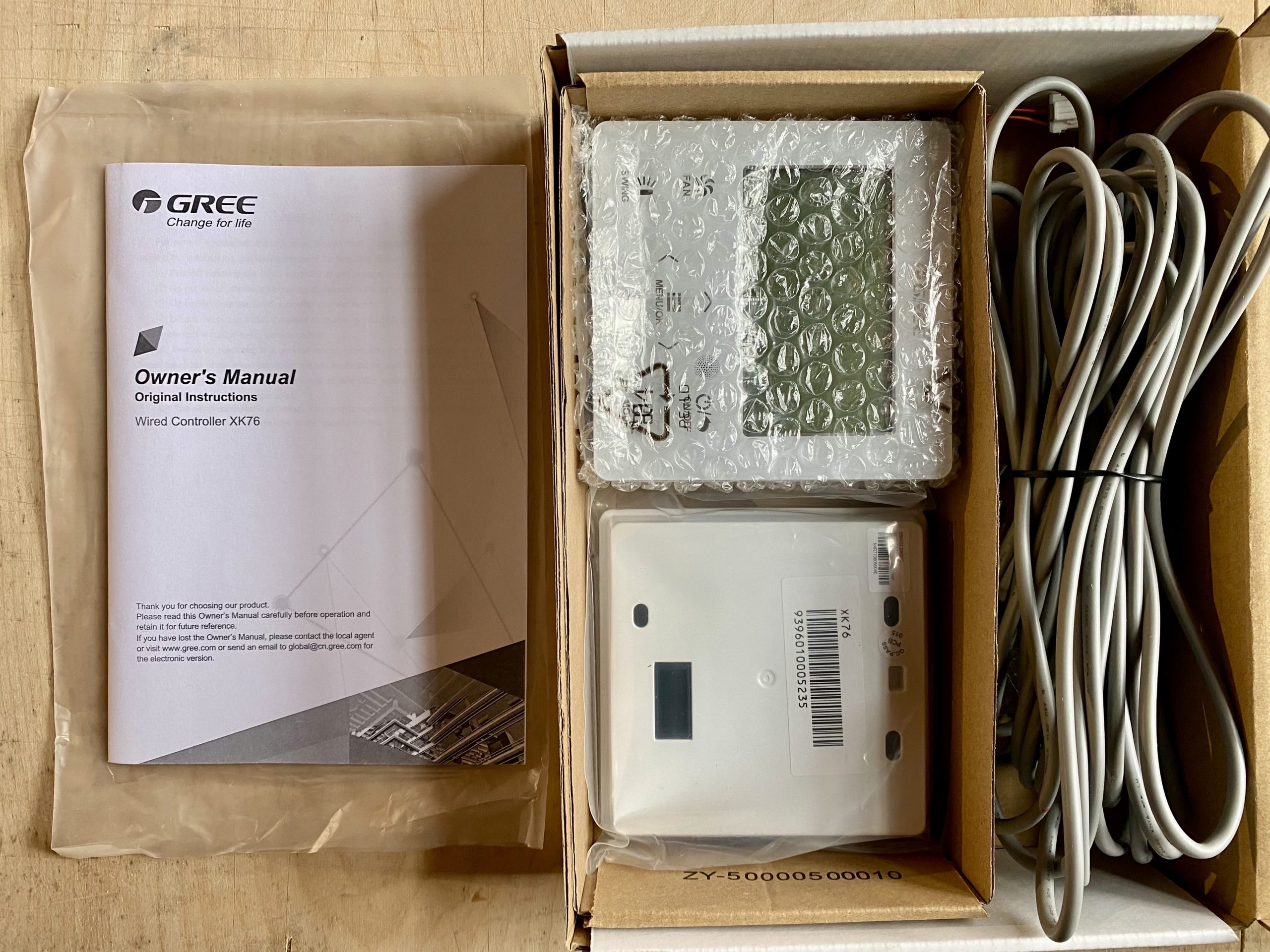XK76 comes in a box with two back panels, a four wire cable and a patch cable.And here is the photo of the PCB which appears to have just a single microcontroller and three physical connection ports with matching drivers and a bunch of passives to drive the screen:
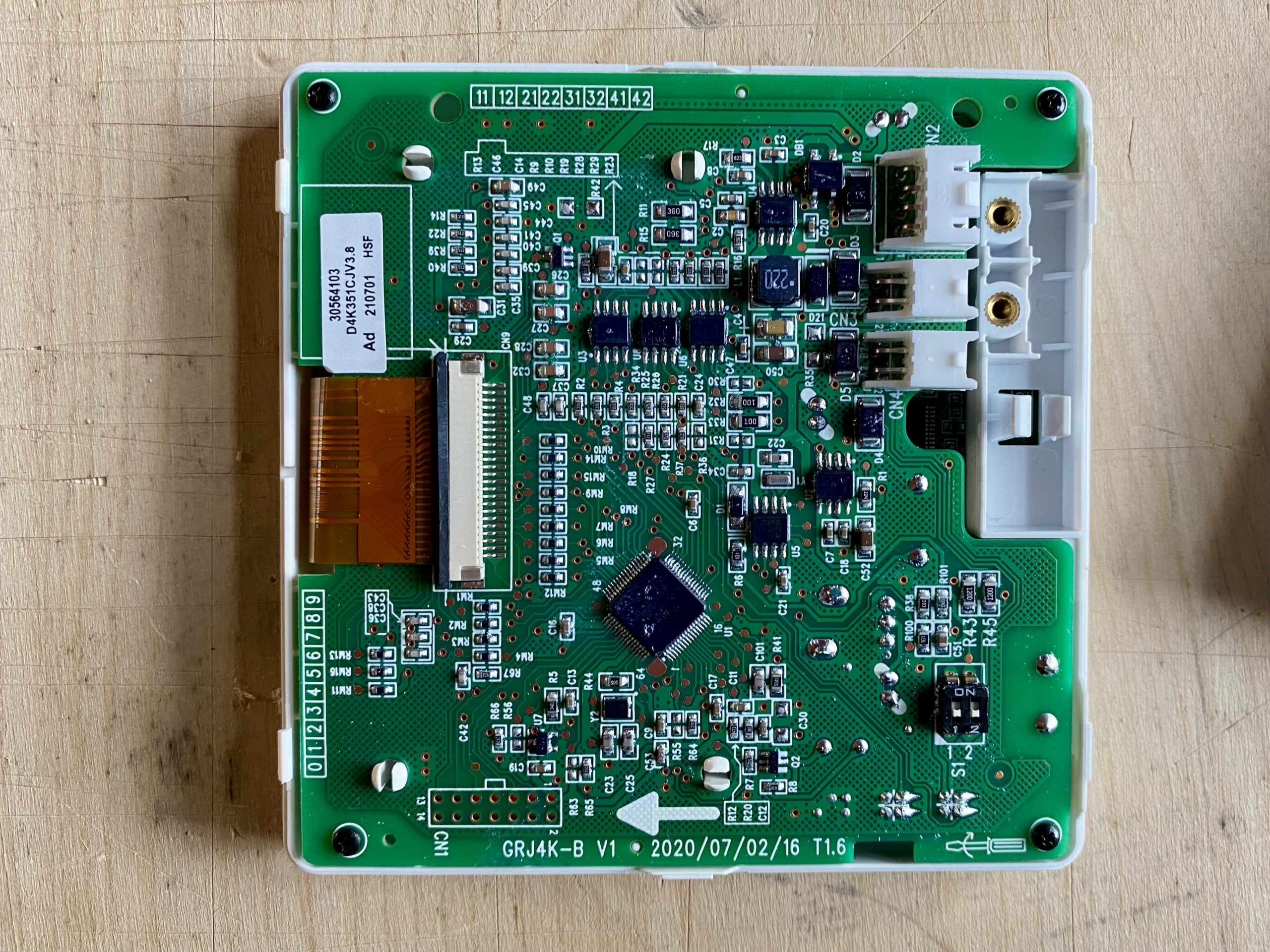The `CN4` connector on the top-right is used to attach the communications cable. With markings GRJ4K-B on the PCB.And here is a photo of the main controller which appears to be [NXP LPC3100 series ARM9](https://www.nxp.com/products/processors-and-microcontrollers/arm-microcontrollers/general-purpose-mcus/lpc3000-arm9:MC_71572):
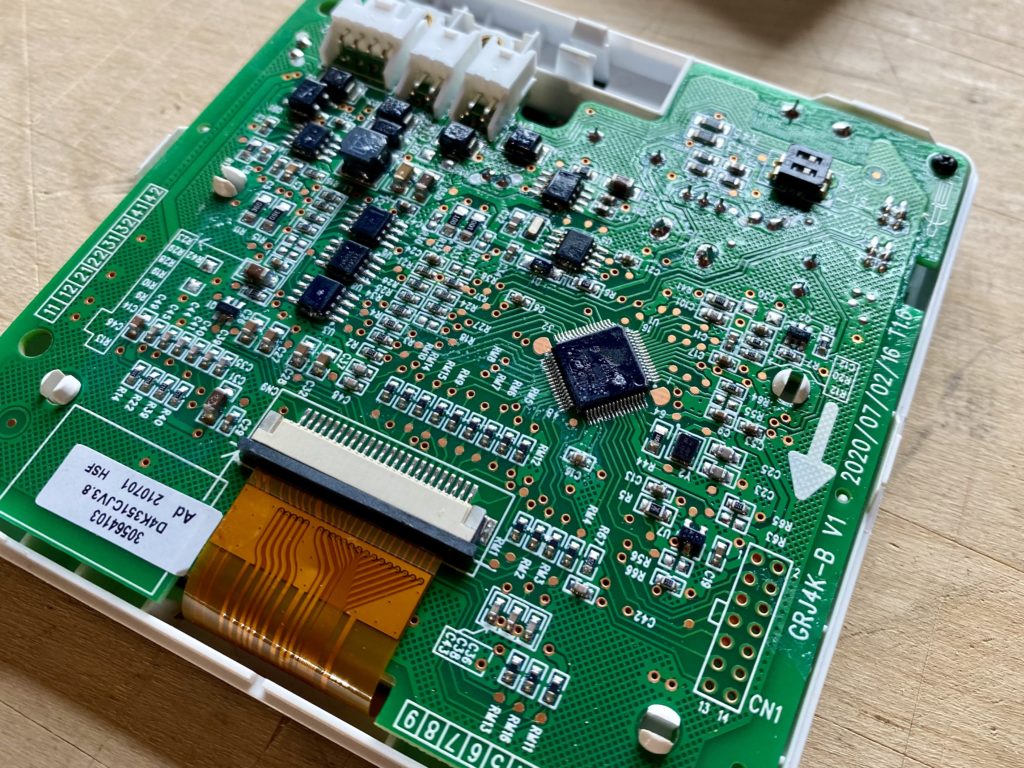Gree XK76 with NXP LPC3100 ARM9 microcontroller.## Outdoor and Indoor Unit Communication
There is no official documentation for the communication protocol used between the indoor and outdoor units. Below are my findings based on reverse-engineering and the insight shared by other enthusiasts after publishing this post.
### System Design
All of the heat pump control logic is handled by the outdoor unit while the indoor unit only requests heating or cooling and sends the temperature readings of the indoor heat exchanger as input for the outdoor control board.
The communication between the outdoor and indoor units happens via a DC signal referenced to the AC power ground.
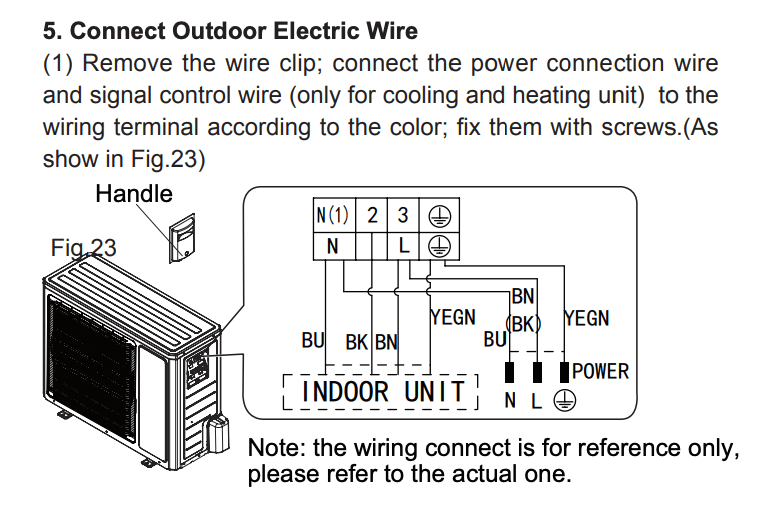Wire labeled “BK” (2) used for communication signal between the indoor and outdoor units.
### Communication Protocol
I was able to attach an oscilloscope and record the following communication between the outdoor and indoor units. See [this thread on Reddit](https://www.reddit.com/r/AskElectronics/comments/ukxui7/how_to_decode_minisplit_heatpump_indoor_and/) for what others think.
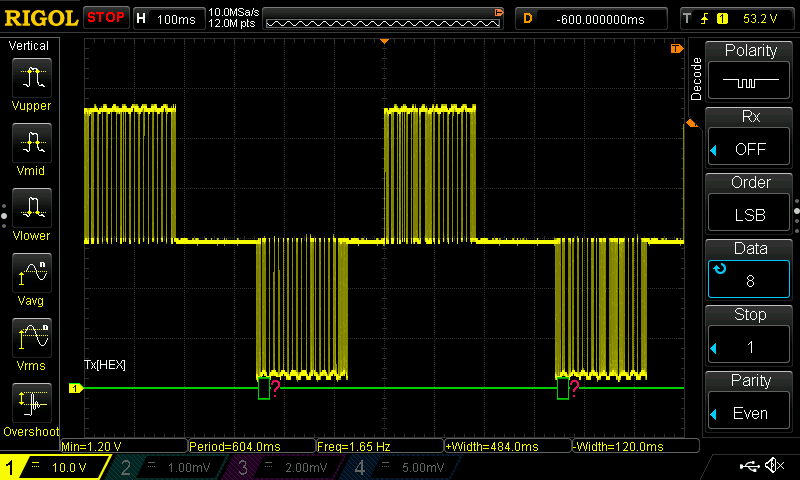Indoor and outdoor unit communication.
It is using a 0-60V serial signal centered around 30V — the outdoor control board keeps the signal at 30V and the indoor unit pulls it low to 0V to send the data. For replies the outdoor unit pulls the signal high to 60V.
The logic analyser was able to decode the serial signal when set to **LSB byte order, 1200 baud rate, 8 data bits, 1 stop bit and even parity**.
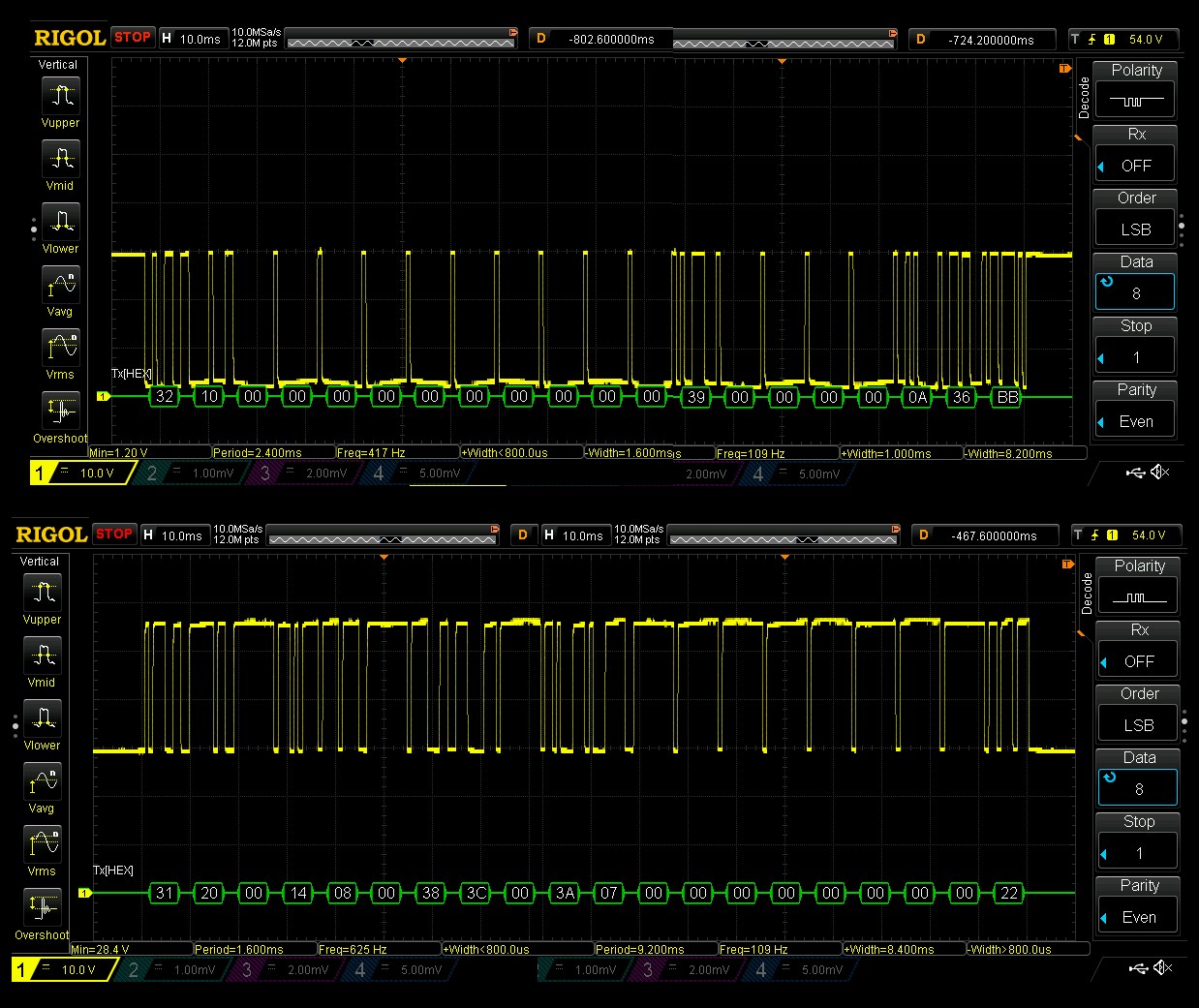Serial communication with 20 bytes of data sent between the indoor and outdoor units.Based on the functionality of the multifunctional inverter testers mentioned below, it should contain the following data:
- Operation mode (heating, cooling)
- Internal fan speed
- Set temperature
- Bus voltage (AC supply)
- Bus current
- Compressor frequency
- Expansion valve opening
- Module temperature (?)
- Inner ring temperature (?)
- Inner tube temperature (?)
- Outer ring temperature (?)
- Outer tube temperature (?)
- Exhaust temperature
- Cold inlet temperature (?)
The first byte indicates the type of the message (`0x31` and `0x32` in the examples above) followed by the actual data bytes closed out by an 8-bit modulo 256 checksum byte. Here are the messages I’ve been able to decode:
#### Message `0x31` Source
ByteHexDecimalValueDescription00x3149Destination or source address?10x2032Destination or source address?20030x14**20****Heating**Mode, 20=heat, 17=cool, 19=ventilation, ?=auto, ?=dry, fan-only=?, off=?40x8**8****Auto**Fan speed, 1=low, 2=medium, 3=high, 4=turbo, 128=off, 8=auto? (low, medium low, medium, medium high, high)50060x38**56****16**Set temperature (value – 40)70x3C**60****20**Room temperature (value – 40)80090x3A**58****18**Refrigerant temperature inside (value – 40)100x7711001200130014001500160017001800190x22**34****34**CheckSum8 Modulo 256#### Message `0x31` Reply
ByteHexDecimalValueDescription0**0x31****49**Destination or source address?1**0x10****16**Destination or source address?2003**0x14****20****Heating**Mode, 20=heat, 17=cool, 19=ventilation, ?=auto, ?=dry, fan-only=?, off=?4**0x20****32****32****Compressor frequency?**5**0x5A****90****90****Outdoor fan frequency?**60070080x11Unknown90x2335Unknown100x6197Unknown110012**0x33****51****11****Outside temperature (value – 40)**13**0x30****48****8****Suction line temperature (value – 40)**14**0x5C****92****52****Discharge line temperature (value – 40)**15001600170x44Unknown180019**0x17****23****CheckSum8 Modulo 256**#### Message `0x32` Source
ByteHexDecimalValueDescription0**0x32****50**Destination or source address?1**0x20****32**Destination or source address?2003004005006007008**0x11****17**Unknown90010001100120013001400150016001700180019**0x63****99**CheckSum8 Modulo 256#### Message `0x32` Reply
ByteHexDecimalValueDescription0**0x32****50**Destination or source address?1**0x10****16**Destination or source address?2003004005006007008009001000110012**0x39****57**Unknown1300140015001600170xA**10**Unknown18**0x36****54**Unknown19**0xBB****187**CheckSum8 Modulo 256There are several other message types that I haven’t yet captured.
### Portable and Multifunctional Tester for Inverter A/C
There appear to be several inverter tester tools which support the single wire communication used by multiple brands. The GT2D3AAa model is often referenced as the “new” version of the older model GZJ10D009 but I haven’t been able to confirm that. Importantly, GZJ10D009 is specifically branded by Gree:
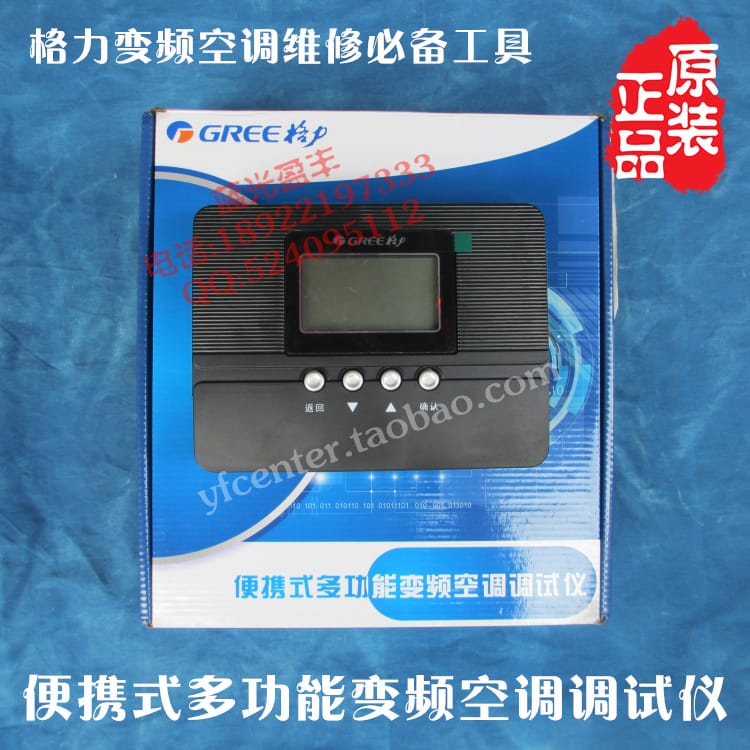Gree GZJ10D009 tester.
And here is the “new” version:
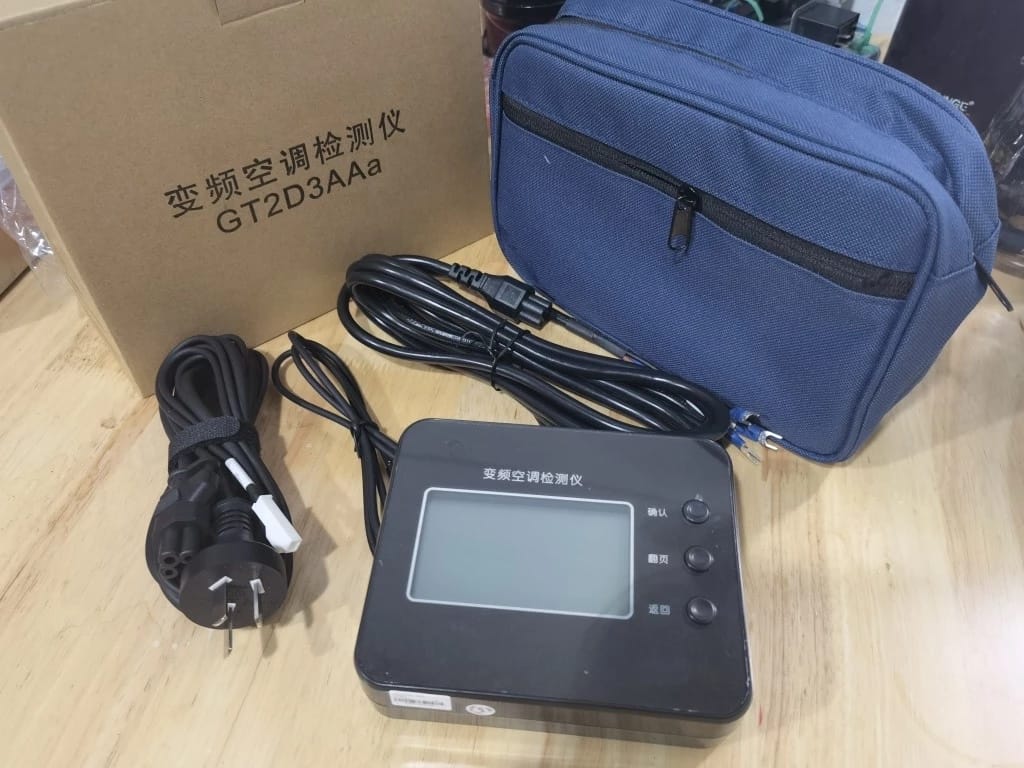GT2D3AAa inverter multifunction tester (source: [AliExpress](https://www.aliexpress.com/item/1005004529164927.html)).
## Drain Pan Heater in Cold Climates
The outside unit contains a resistive heater for the drain pan which is turned on and draws constant 100W when the outside temperature falls below 0C (32F) **even when the unit is not running or defrosting anything** (there might be a setting that controls this but I haven’t been able to find it).
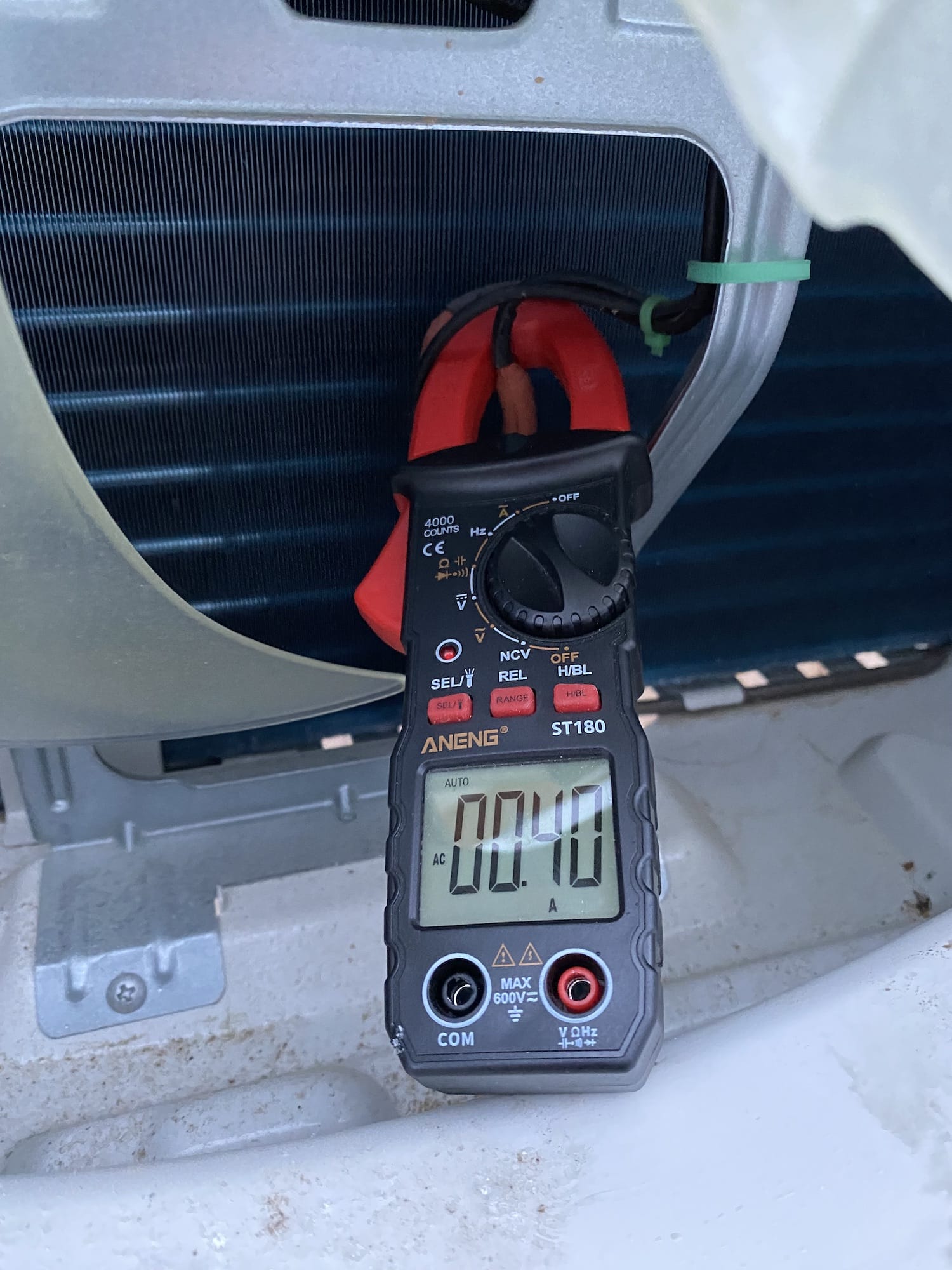Drain pan heater drawing 0.4A at 240V during freezing temperatures.
This leads to 2.4kWh of additional energy consumption per day which is unfortunate. Note that the heater is only for the drain pan and not the compressor so there is no reason it should be on for more than the defrost cycle and some time after it.
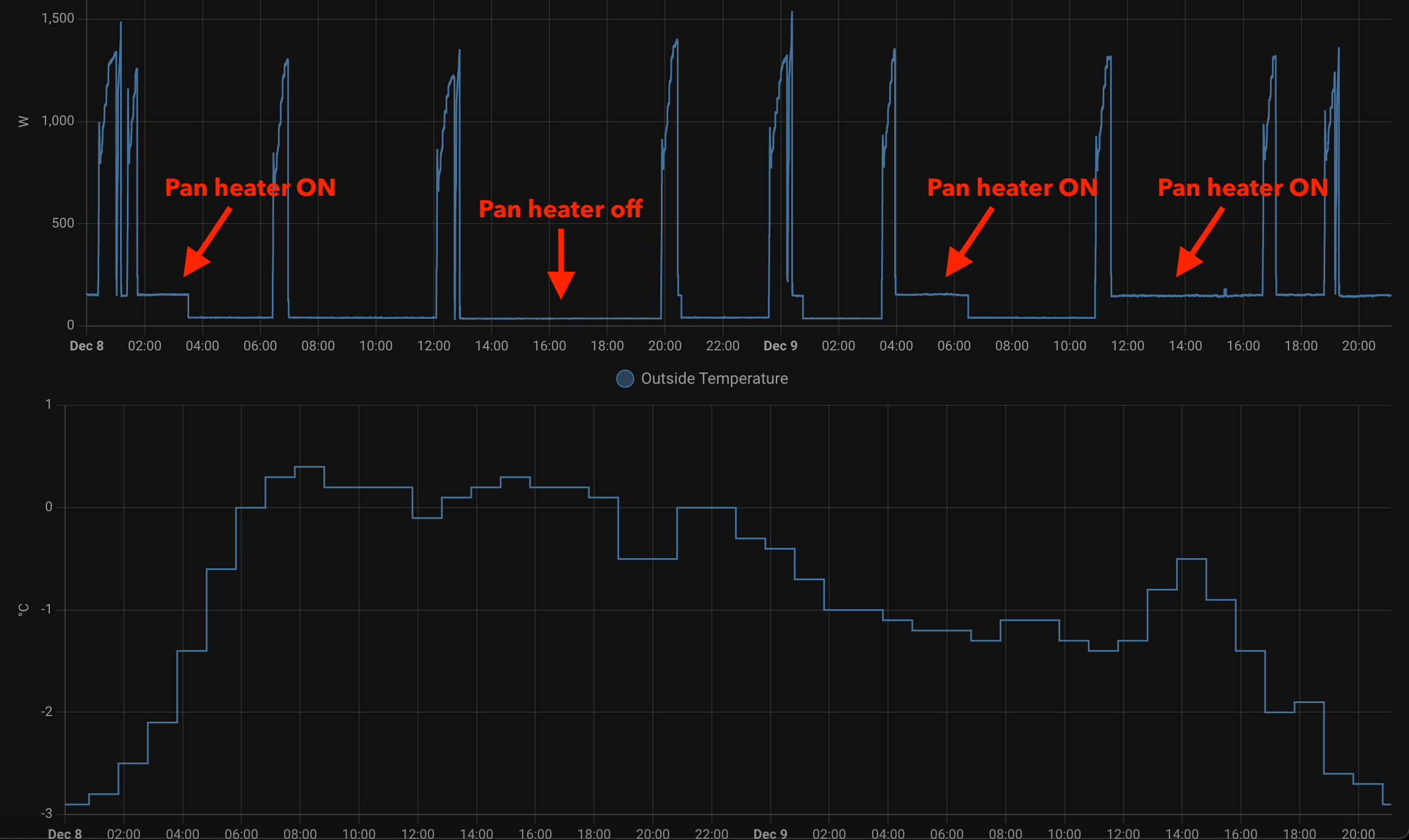Gree drain pan heater drawing 100W during cold weather.The compressor compartment and piping are really well insulated:
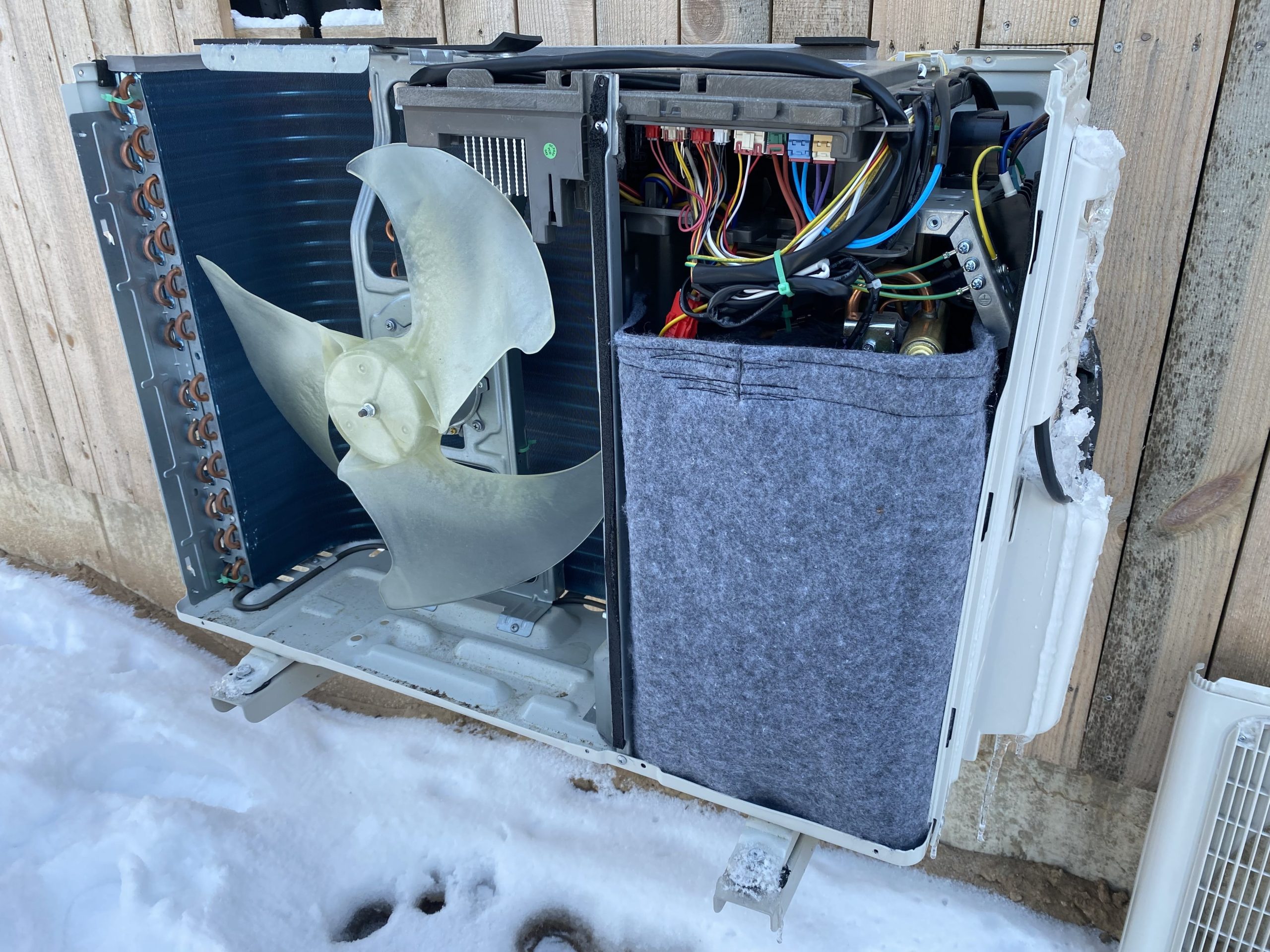Gree GWH09YD-S6DBA2A outdoor unit.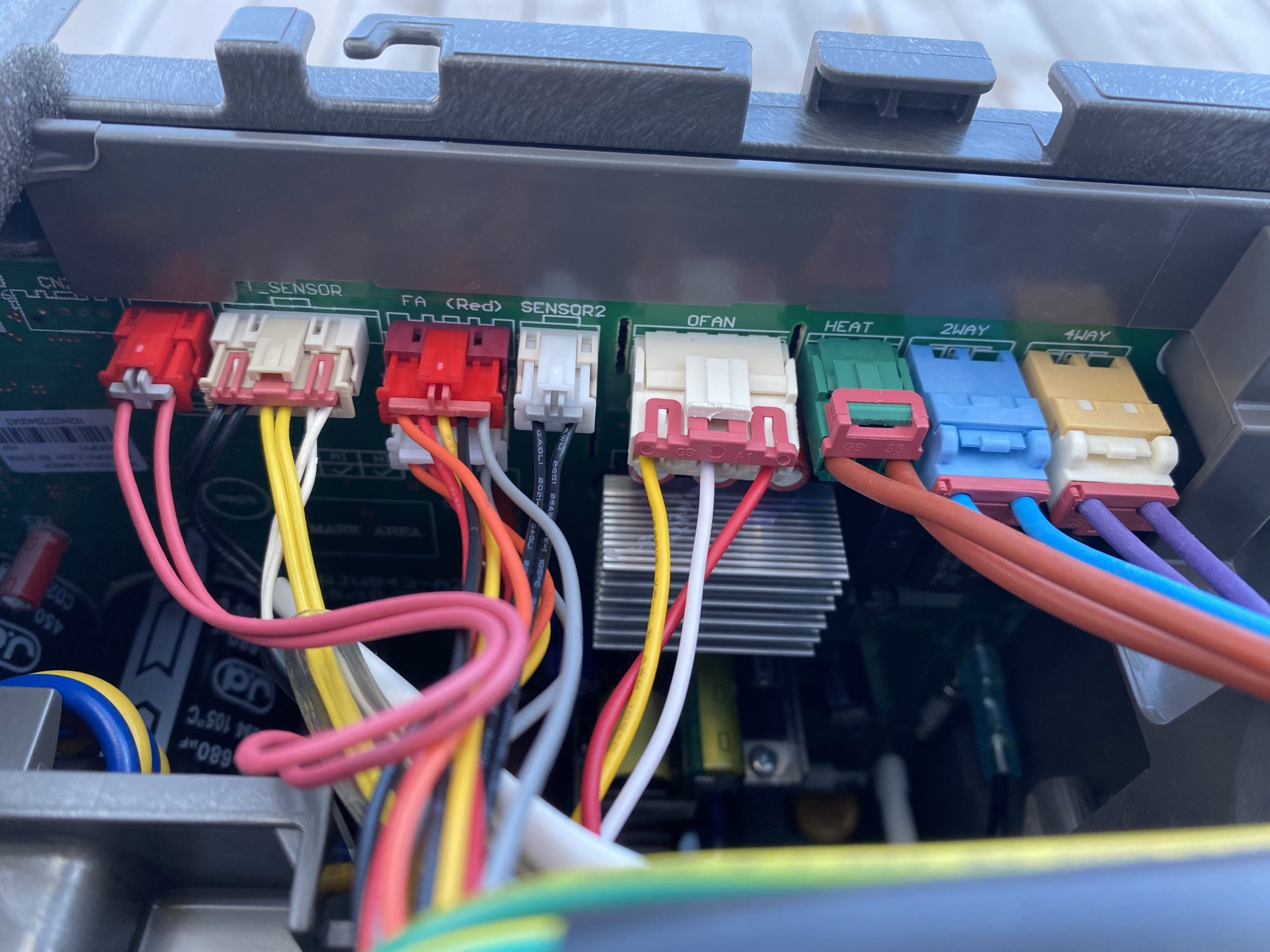Gree GWH09YD-S6DBA2A outdoor controller connections.Notice how the `4WAY` valve 220V switch is almost right next to the `HEAT` connection for the resistive heater so it should be possible to connect a timer relay which keeps the heater running only for 10 or 30 minutes after the defrost cycle.
## Forums and Links
- [Heat pump builder community on Facebook](https://www.facebook.com/groups/2208343752742110/) (in Polish) where people convert air-source mini-split heat pump to heat water for heating.