---
title: Fixing «PostPost» and «Ozh' Absolute Comments» Plugins
date: 2008-06-22T13:33:50+00:00
modified: 2012-10-21T10:48:19+00:00
image:: https://kaspars.net/wp-content/uploads/2008/06/postpost-plugin-settings-feed-footer.png
permalink: https://kaspars.net/blog/fixing-postpost-and-ozh-absolute-comments-plugins
post_type: post
author:
name: Kaspars
avatar: https://reverse.kaspars.net/gravatar/avatar/92bfcd3a8c3a21a033a6484d32c25a40b113ec6891f674336081513d5c98ef76?s=96&d=mm&r=g
post_tag:
- Plugin
category:
- WordPress
---
# Fixing «PostPost» and «Ozh’ Absolute Comments» Plugins
I use a modified version of the simple *[PostPost](http://www.douglaskarr.com/projects/postpost/ "Read more about PostPost plugin")* plugin created by [Douglas Karr](http://www.douglaskarr.com/ "Visit author homepage") to display one sentence affiliate advertising in my [RSS feed](http://feeds.feedburner.com/KonstruktorsNotes "Konstruktors Notes RSS feed") for entries that contain more than 700 letters.
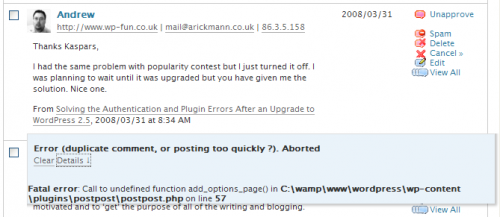
Today I installed the very useful *[Ozh’](http://planetozh.com/ "Author of Absolute Comments plugin") [Absolute Comments](http://planetozh.com/blog/my-projects/absolute-comments-manager-instant-reply/ "Read more about Ozh' Absolute Comments plugin")* plugin that makes the process of replying to comments a lot easier. However, when trying out the inline (and ajaxy) *comment reply* feature within the ‘Manage Comments’ section of WordPress admin for the first time, I got the following error message:
> **Error (duplicate comment, or posting too quickly ?). Aborted**
>
> `Fatal error: Call to undefined function: add_options_page() in /.../wp-content/plugins/postpost/postpost.php on line 88`
[](https://kaspars.net/wp-content/uploads/2008/06/postpost-error-message.png)
Line 88 of `postpost.php` contains the following:
> `add_action('admin_head', 'wppp_add_options_page');`
In all of my plugins I have used the `admin_menu` hook for adding plugin settings page, so **the solution** was simply to **replace `admin_head` with `admin_menu`**, like this:
> `add_action('admin_menu', 'wppp_add_options_page');`
**Download [PostPost 1.3](https://kaspars.net/wp-content/uploads/2008/06/postpost.zip)** which allows you to specify three rotating feed footers for posts that exceed certain number of letters.
### Fixing the *Reply Prefill* backslash error in Ozh’ Absolute Comments (2.2)
**Update**: Ozh has updated the plugin (version 2.2.1) and it fixes the problem mentioned below. To get the latest version use the automatic plugin updater or download it from the [WordPress Extend](http://wordpress.org/extend/plugins/ozh-absolute-comments/ "Get the latest version of Ozh Absolute Comments").
Reply Prefill is a really handy feature that automates the process of referring to the author of a comment you are replying to.
The default reply prefill looks like this: `@%%name%%:... ,` but I wanted to include also a link to the original comment: `%%name%%, ...`
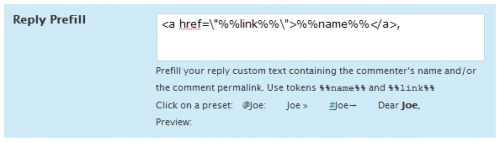
However, after saving the settings, the new prefill contained added backslashes before the quotes: `%%name%%, ...`. It was immediately clear that backslashes are added when the user input is sanitized before saving it *to* the database, and not removed when retrieved *from* the database.
[](https://kaspars.net/wp-content/uploads/2008/06/absolute-comments-prefill-error.png)
The **solution** is to strip slashes *before* the output is presented to a user — open the `_admin.php` file located in `/ozh-absolute-comments/includes/` folder, and replace
> `$prefill = $wp_ozh_cqr['prefill_reply'];` (line 40)
with
> `$prefill = stripslashes($wp_ozh_cqr['prefill_reply']);`
and that’s it — comment prefills look exactely like they should.