---
title: ‘Clear APC Cache’ Button for WordPress
date: 2010-05-01T21:22:44+00:00
modified: 2010-06-01T12:57:22+00:00
image:: https://kaspars.net/wp-content/uploads/2010/05/clear-apc-cache-wordpress-e1272748867586.png
permalink: https://kaspars.net/blog/clear-apc-cache-button-for-wordpress
post_type: post
author:
name: Kaspars
avatar: https://reverse.kaspars.net/gravatar/avatar/92bfcd3a8c3a21a033a6484d32c25a40b113ec6891f674336081513d5c98ef76?s=96&d=mm&r=g
post_tag:
- How to
- Snippet
category:
- WordPress
---
# ‘Clear APC Cache’ Button for WordPress
Here is a quick way to clear APC opcode cache with a single click within your WordPress dashboard — simply add this to your theme’s `functions.php`:
```
if (function_exists('apc_clear_cache')) {
// Clear cache if something is edited
if (!empty($_POST) && is_admin())
apc_clear_cache();
// Add Clear APC menu under Tools menu
add_action('admin_menu', 'php_apc_info');
function php_apc_info() {
add_submenu_page('tools.php', 'Clear APC', 'Clear APC', 'activate_plugins', 'clear_php_apc', 'php_apc_options');
}
function php_apc_options() {
if (apc_clear_cache() && apc_clear_cache('user'))
print 'All Clear!
';
else
print 'Clearing Failed!
';
print ''; print_r(apc_cache_info()); print '';
}
// Add Clear APC in the favorite actions dropdown
add_filter('favorite_actions', 'clear_apc_link');
function clear_apc_link($actions) {
$actions['tools.php?page=clear_php_apc'] = array('Clear APC', 'edit_posts');
return $actions;
}
}
```
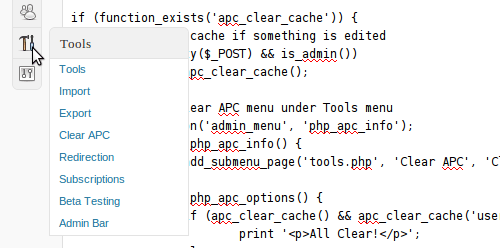
And the result looks like this:
p.s. It seems that WordPress doesn’t like newline returns inside ``.